



Zooming Out: WebinarTV’s Rampant Scraping of Online Meetings
This report is distributed as TLP:CLEAR. Recipients may share this information without restriction. Information is subject to standard copyright rules.
Summary
CyberAlberta recently discovered that a webinar hosting platform known as WebinarTV is actively scraping and redistributing both public and private Zoom webinars without knowledge or consent of organizers. Initial access is typically gained through third-party browser extensions such as AI-powered transcription or auto-join tools. These extensions are inadvertently provided calendar permissions by their users and, in some cases, users are willfully submitting meeting details to the WebinarTV platform without the knowledge or consent of the organizers.
While WebinarTV’s CEO claims to be compliant with copyright law and offers a takedown process, multiple users have reported unauthorized content uploads and ineffective removal procedures. The platform’s business model and associated infrastructure suggest a deliberate and scalable operation that poses ongoing privacy, reputational, and legal risks. Webinar organizers are strongly encouraged to audit their meeting configurations, restrict access to third-party tools, and take steps to safeguard against users intentionally leveraging WebinarTV.
Details
In late August, a Government of Alberta (GoA) ministry discovered that a recent webinar had been uploaded to WebinarTV, an online video-sharing platform that markets itself as “Organizing the world’s webinars”, without the ministry’s knowledge. Although the ministry had intended to eventually share the webinar with stakeholders, the unauthorized posting raised concerns about privacy and the risk of similar incidents affecting more sensitive meetings. The organizers were unable to determine with confidence how the recording appeared online. However, this incident coincides with numerous open-source reports of nearly identical events involving WebinarTV, providing insight into common characteristics of this activity and potential causes behind the unauthorized redistribution of webinars.
There have been many reports on social media12 as well as online review boards3 indicating hidden scraping of not just publicly advertised webinars, but supposedly private meetings as well. Many organizers reported first learning that their webinars had been made publicly available through a notification email from WebinarTV themselves. The boiler plate email, sent by “Sarah Blair, VP of Communications, WebinarTV[.]us”4 informs recipients that their webinar was now accessible on the platform, and broken down into “chapters.” A sample of this email template, as shared by a Reddit user, is shown below (Figure 1). Some affected organizers also retroactively identified unfamiliar registrants who had joined their session using anomalous email domains, such as @bestwest[.]space, which has been observed in at least two separate incidents.
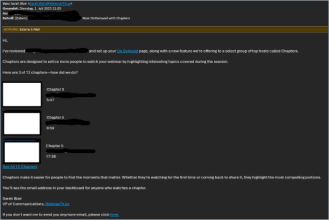
Figure 1 – Boiler plate email from Sarah Blair at WebinarTV, notifying the recipient that their webinar is now publicly available on their platform. Source: Reddit. 5
WebinarTV appears to operate a business model centered around a promotional service called “Lead Advantage”, which it offers for a fee. The platform scrapes webinars en masse and positions itself as a facilitator to help these webinars reach a broader audience, which in the case of private webinars is the opposite intention.
According to WebinarTV’s FAQs, Lead Advantage enables “hosts” (a term it uses to refer to individuals whose content has been scraped) to “promote their webinars through web placements, email distribution, and higher prominence directory listings”. The service encourages these hosts to bid for increased exposure, with bidding starting at USD $20.
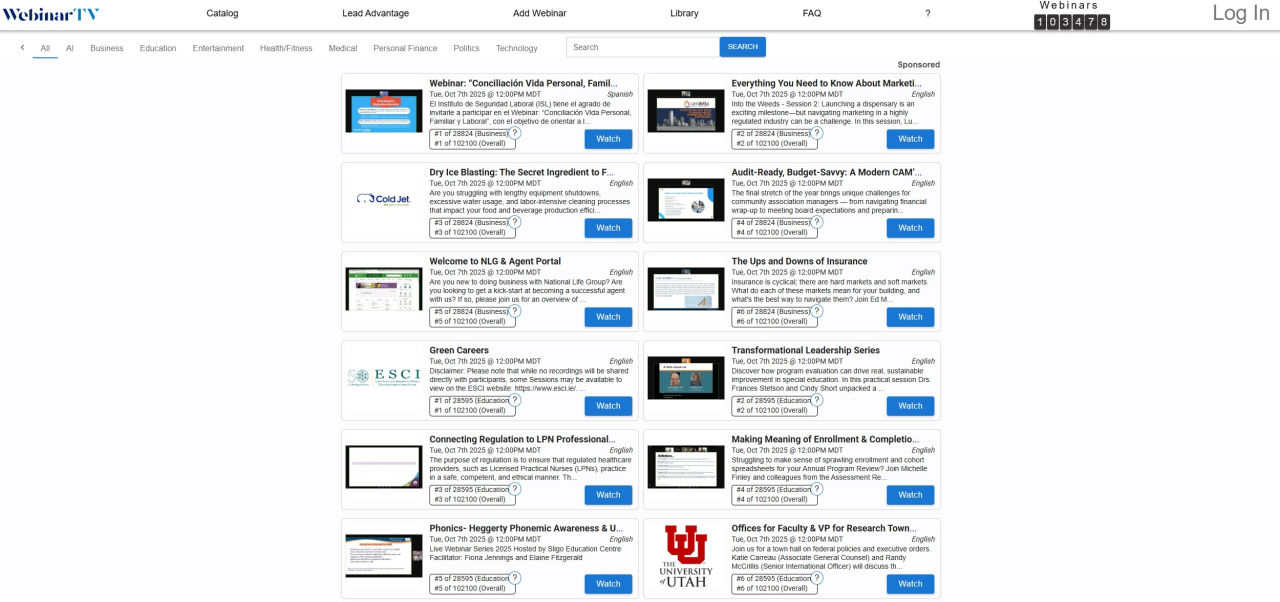
Figure 2 – WebinarTV’s Catalog. Source: WebinarTV[.]us
WebinarTV claims that higher bids “ensure better visibility and access to a more engaged audience,” effectively turning scraped meetings into the underlying product of an auction system. This model incentivizes content owners to pay for visibility of their own material, under the guise of promotional outreach.
Initial Access and Persistence
CyberAlberta’s investigation found that WebinarTV primarily gains initial access to Zoom webinars via third-party browser extensions. These extensions can access webinar links when a user either inadvertently grants calendar permissions—exposing meeting invitations—or willfully submits meeting details into the WebinarTV platform.
WebinarTV is believed to leverage a range of browser extensions that provide functionalities such as AI powered transcription and note-taking tools, or tools to automate the joining of online meetings. The platform mostly relies on the widespread use of these tools by end users, rather than operating them directly. However, at least one of the known extensions is listed on the Chrome Web Store as developed by WebinarTV.
Known extensions associated with this activity include, but are not limited to:
- GoTo Webinar & Meeting Download Recordings (published by meetingtv[.]us)
- Auto Join for Google Meet
- Meet Auto Admit
- OtterAI
- NottaAI
While most of these tools are not directly affiliated with WebinarTV, they serve as common vectors for the potential exposure of private webinar content. This finding is supported by information provided to CyberAlberta by Zoom, as well as recurring reports from webinar organizers who observed unauthorized use of AI-powered transcription and note-taking tools in their affected sessions.67
Collection
Once these tools join a meeting—either with or on behalf of a user—the session content is captured and subsequently published on WebinarTV.us. By analysing previews of uploaded webinars, CyberAlberta validated claims made by online users8 that WebinarTV uses screen capture to scrape content, rather than using Zoom’s built-in “Record” function. The available previews display screenshots consistent with a screen-captured view, rather than the format produced by a native Zoom recording (Figure 3).
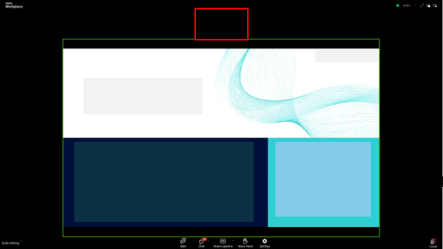
Figure 3 – Preview of a scraped webinar (with speaker and content redacted) which shows the use of screen capture.
Impact
Whether WebinarTV obtained access through publicly advertised links or inadvertently compromised private sessions via a third-party browser extension, the privacy and security implications remain significant. As many users have noted, the uploaded webinars often expose the names and contact details of attendees, and in some cases, sessions were designated as private due to sensitive organizational discussions, raising concerns about loss of confidentiality and reputational damage.
Ethics and Legality
WebinarTV’s CEO, Michael Robertson, has repeatedly defended the platform in posts on LinkedIn9, Reddit1011, and Trustpilot (giving their own service multiple five-star reviews) 12, claiming the platform only catalogs free and public webinars, complies with DMCA regulations, and offers a removal process. However, many users allege that takedown requests are ignored or delayed and repeatedly argue that content is being harvested without permission, often appearing confused as to how WebinarTV gained access to a webinar the organizers believed to be private.
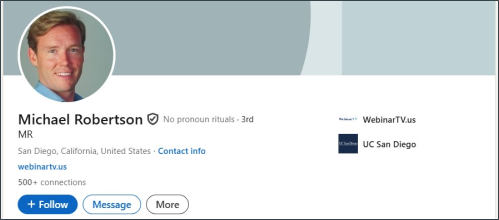
Figure 4 – LinkedIn profile for WebinarTV CEO Michael Robertson. Source: LinkedIn
The LinkedIn profile for Michael Robertson (Figure 4) was created in June 2008. This early creation date suggests the account is not a recently fabricated persona intended to lend credibility to WebinarTV. Instead, it indicates this profile, and associated Reddit13 and Trustpilot14 accounts, likely belong to the same Michael Robertson who previously served as CEO of the now-defunct online music library MP3Tunes, which was found liable for copyright infringement and ordered to pay USD $41 million in 201415.

Figure 5 – In a 2014 court ruling, Michael Robertson was found liable for copyright infringement. Source: Billboard
The legality of WebinarTV’s practices likely varies by jurisdiction, with cases in the United States (US) hinging on the Digital Millennium Copyright Act (DMCA) “safe harbor” provision16, while recordings of meetings in Canada is likely protected by the “one-party consent” rule17.
Connected Infrastructure
WebinarTV has two known domains associated with publicly hosting scraped webinars (webinartv[.]us and meetingtv[.]us), both of which were registered using Namecheap and hosted on Google IP space (AS 15169). Pivoting on these characteristics identified 29 further domain names, all sharing an apex domain of either “webinartv”, “meetingtv” or “topwebinar”, using many different top-level domains (TLDs) i.e., “.shop”, “.xyz”, “.org”, “.biz” etc., and all hosted on the same Google subnet (216.239.32.0/19). All connected infrastructure is listed below in the Indicators of Compromise (IOCs).
Assessment
CyberAlberta assess that WebinarTV will almost certainly continue scraping Zoom webinars made accessible through third-party browser extensions, capturing content and repurposing it on its platform as part of its monetization strategy. Given the ethical and privacy concerns, organizations are advised to review and secure online meeting configurations to reduce the risk of webinar scraping. Recommendations and detection opportunities are provided below to support improved webinar security and privacy posture.
Recommendations
The following recommendations are provided to mitigate possible points of initial access for webinar scrapers to Zoom meetings.
- Configure Zoom authentication settings to allow only authenticated users or restrict access to users with email addresses from approved domains.18
- Require advance registration to attend meetings, allowing hosts to pre-approve attendees and prevent unauthorized access.19
- Block domains associated with AI transcription and note-taking tools from joining Zoom meetings.20
- Once the session has started and all required attendees are present, lock the meeting21 to prevent any new unwanted attendees in the form of bot accounts from third-party browser extensions.
- Require passcodes for all attendees to gain entry to the meeting.22
- If any unwanted AI transcription or note taking tools have been discovered in the meeting, use the “Manage Participants” options to remove them23
- If a webinar’s privacy is believed to have been violated, formal complaints can be submitted the Office of the Privacy Commissioner of Canada (OPC)24 or to Alberta’s Office of the Information and Privacy Commissioner (OIPC).25
- Consider implementing blocks on the extension IDs of any third-party browser extensions identified as potentially unwanted. A list of the referenced extensions is provided in the Detection Opportunities section below (Figure 6).
- In Microsoft environments, extension ID blocking can be configured via Intune. 26
- The Canadian Centre for Cyber Security (CCCS) has released guidance for securing multiple video-teleconferencing (VTC) platforms such as Slack and Microsoft Teams to safeguard against similar threats to privacy.27
Detection Opportunities
To view extension usage in Microsoft Defender, go to the Endpoints > Vulnerability management > Inventories menu, then select the ‘Browser extensions’ tab. This view provides details about each extension in the environment such as extension ID, what devices they’re installed on, which users are using them, and crucially, what permissions have been granted.
Alternatively, the following KQL queries can assist with detecting the use of potentially unwanted third-party browser extensions.
|
// Identify browser extensions running in the environment
DeviceTvmBrowserExtensions | where ExtensionId != ” ” // and IsActivated == “true”
// Detect the use of specific potentially unwanted third-party browser extensions let ExtensionIDs = dynamic([‘cphibdhgbdoekmkkcbbaoogedpfibeme’, ‘ajfokipknlmjhcioemgnofkpmdnbaldi’, ‘ceofheakaalaecnecdkdanhejojkpeai’, ‘bnmojkbbkkonlmlfgejehefjldooiedp’, ‘kdelkaogljjcbjffjmahedaobfjineig’, ‘meimoidfecamngeoanhnpdjjdcefoldn’]); DeviceTvmBrowserExtensions | where ExtensionId in (ExtensionIDs) // and IsActivated == “true” |
| Third-Party Browser Extension | Extension ID |
| GoToWebinar & GoToMeeting Download Recordings | cphibdhgbdoekmkkcbbaoogedpfibeme |
| Auto-join for Google Meet | ajfokipknlmjhcioemgnofkpmdnbaldi |
| Meet auto admit | ceofheakaalaecnecdkdanhejojkpeai |
| Otter.ai: Record & Transcribe Meetings – Google Meet & Web Audio | bnmojkbbkkonlmlfgejehefjldooiedp |
| Notta: AI Meeting Notetaker & Audio Transcription | kdelkaogljjcbjffjmahedaobfjineig |
| Fireflies: AI meeting notes | meimoidfecamngeoanhnpdjjdcefoldn |
Figure 6 – Extension IDs of potentially unwanted third-part browser extensions.
Indicators of Compromise (IOCs)
The following IOCs characterize WebinarTV activity described in this report.
| Description | Indicator |
| Known domains for WebinarTV | webinartv[.]us |
| meetingtv[.]us | |
|
Domains identified using similar name, hosted on same subnet, and registered using Namecheap |
meetingtv[.]cc |
| meetingtv[.]in | |
| meetingtv[.]link | |
| meetingtv[.]online | |
| meetingtv[.]org | |
| meetingtv[.]top | |
| meetingtv[.]xyz | |
| topwebinars[.]us | |
| webinartv[.]biz | |
| webinartv[.]cam | |
| webinartv[.]cc | |
| webinartv[.]cloud | |
| webinartv[.]club | |
| webinartv[.]co | |
| webinartv[.]digital | |
| webinartv[.]guru | |
| webinartv[.]info | |
| webinartv[.]ink | |
| webinartv[.]me | |
| webinartv[.]net | |
| webinartv[.]online | |
| webinartv[.]pics | |
| webinartv[.]quest | |
| webinartv[.]rocks | |
| webinartv[.]shop | |
| webinartv[.]today | |
| webinartv[.]top | |
| webinartv[.]wiki | |
| webinartv[.]xyz | |
| IP Addresses (not recommended for blocking due to shared hosting) | 216.239.32[.]21 |
| 216.239.34[.]21 | |
| 216.239.36[.]21 | |
| 216.239.38[.]21 |
Table 1 – WebinarTV Indicators of Compromise
MITRE ATT&CK
The following table maps tactics, techniques, and procedures (TTPs) described in this report to the MITRE ATT&CK Framework.
| Tactic | Technique | Observable |
| Initial Access | T1199: Trusted Relationship | WebinarTV potentially registers for publicly advertised webinars or leverages a browser extension present on a legitimate attendee’s browser. |
| Persistence | T1176.001: Software Extensions: Browser Extensions | WebinarTV potentially maintains access through a browser extension, providing the ability to infiltrate all webinar’s attended by those who use the browser extension in question. |
| Collection | T1113: Screen Capture | WebinarTV collects video and audio of webinars through desktop screen capture. |
Table 2 – WebinarTV TTPs
