



Close Menu

    Subscribe to Updates

    Get the latest creative news from FooBar about art, design and business.

    What's Hot

    Researchers escape OpenAI Codex sandbox to run commands on host

    September 20, 2026

    Microsoft Teams will let admins block custom file extensions

    September 20, 2026

    Viral AI actress’ hotline face-scans every caller, watches their mood

    September 20, 2026
    Facebook X (Twitter) Instagram
    • Demos
    • Technology
    • Gaming
    • Buy Now
    Facebook X (Twitter) Instagram Pinterest Vimeo
    Canadian Cyber WatchCanadian Cyber Watch
    • Home
    • News
    • Alerts
    • Tips
    • Tools
    • Industry
    • Incidents
    • Events
    • Education
    Subscribe
    Canadian Cyber WatchCanadian Cyber Watch
    Home»News»Microsoft says Copilot buttons still missing in classic Outlook
    News

    Microsoft says Copilot buttons still missing in classic Outlook

    adminBy adminSeptember 16, 2026No Comments3 Mins Read
    Share Facebook Twitter Pinterest LinkedIn Tumblr Reddit Telegram Email
    Share
    Facebook Twitter LinkedIn Pinterest Email


    Microsoft Copilot

    Microsoft says it’s still investigating a known issue that causes the Copilot and Copilot Chat buttons in classic Outlook to disappear for some Windows users.

    As it acknowledged when it announced a fix via a service change in June, this affects only customers with the Copilot Chat (Basic) license or a paid M365 Copilot (Premium) account who may no longer see the Copilot buttons in the side navigation and above the ribbon.

    According to Microsoft, affected users may also experience one or more of the following issues:

    • The Copilot button is missing from the top-right area above the ribbon.
    • The Copilot icon is missing from the left app bar or More Apps area in classic Outlook.
    • In Add Apps, Copilot may appear as an available app, but selecting Open does nothing.
    • Adding Copilot through ribbon customization may show the command as unavailable or grayed out.
    • Copilot remains available from other entry points, such as Outlook on the web or the Microsoft 365 Copilot standalone app or web experience.

    However, in a recent update, Microsoft said it’s still investigating the issue and confirmed it happens after upgrading classic Outlook for Windows to build 20026.20182 and higher.

    “The Outlook Team is actively investigating this issue. Current analysis indicates that, in affected environments, Outlook is unable to locate the MAPI property PR_PROFILE_USER_SMTP_EMAIL_ADDRESS_W within the null profile section,” Microsoft said.

    “As a result, the Outlook Copilot component cannot persist in Copilot-related settings, which may prevent the Copilot entry point from appearing in the Outlook navigation pane.”

    While it’s still working on a permanent fix, Microsoft has shared a temporary workaround that requires enabling the “Show Apps in Outlook” option in classic Outlook settings.

    To do that, select the File tab, then Options, go to Advanced, and check the box for “Show Apps in Outlook” under “Outlook panes,” as shown in the image below.
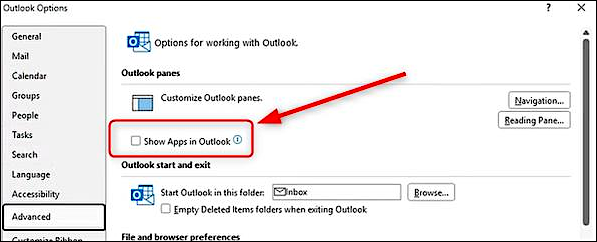
    “Show Apps in Outlook” option (Microsoft)

    Affected users can also create a new Outlook profile or use the new Outlook email client or Outlook Web Access (OWA), which are not affected by this bug.

    Microsoft has also confirmed a bug that causes unexpected Outlook crashes on systems running Kaspersky Antivirus software, triggering “Event 1000” events in the Application log linked to the Kaspersky Mail Checker (mcou.dll).

    Although the Outlook Team is still investigating, it advised Kaspersky customers experiencing crashes to contact Kaspersky support.

    Earlier this year, Microsoft also resolved known issues that rendered the classic Outlook client unusable when enabling the Microsoft Teams Meeting Add-in and prevented some classic Outlook users from sending emails via Outlook.com.


    article image

    Join Mikko Hyppönen and security leaders from the NFL, CHANEL, and Atlassian for a two-hour digital summit on what AI-speed attacks change, what defenders should stop doing, and how to validate, decide, fix, and re-validate at machine speed.

    Save your seat


    Source link

    Share. Facebook Twitter Pinterest LinkedIn Tumblr Email
    Previous ArticleSpain’s data agency gets first report of AI-powered data breach
    Next Article Free Web Hacking Challenge!
    admin
    • Website

    Related Posts

    News

    Researchers escape OpenAI Codex sandbox to run commands on host

    September 20, 2026
    News

    Microsoft Teams will let admins block custom file extensions

    September 20, 2026
    News

    Viral AI actress’ hotline face-scans every caller, watches their mood

    September 20, 2026
    Add A Comment

    Comments are closed.

    Demo
    Top Posts

    Catchy & Intriguing

    March 17, 202679 Views

    How fraudsters target credit unions

    May 4, 202644 Views

    IP Address Investigations and Local OSINT

    March 20, 202641 Views
    Stay In Touch
    • Facebook
    • YouTube
    • TikTok
    • WhatsApp
    • Twitter
    • Instagram
    Latest Reviews
    85
    Featured

    Pico 4 Review: Should You Actually Buy One Instead Of Quest 2?

    January 15, 2021 Featured
    8.1
    Uncategorized

    A Review of the Venus Optics Argus 18mm f/0.95 MFT APO Lens

    January 15, 2021 Uncategorized
    8.9
    Editor's Picks

    DJI Avata Review: Immersive FPV Flying For Drone Enthusiasts

    January 15, 2021 Editor's Picks

    Subscribe to Updates

    Get the latest tech news from FooBar about tech, design and biz.

    Demo
    Most Popular

    Catchy & Intriguing

    March 17, 202679 Views

    How fraudsters target credit unions

    May 4, 202644 Views

    IP Address Investigations and Local OSINT

    March 20, 202641 Views
    Our Picks

    Researchers escape OpenAI Codex sandbox to run commands on host

    September 20, 2026

    Microsoft Teams will let admins block custom file extensions

    September 20, 2026

    Viral AI actress’ hotline face-scans every caller, watches their mood

    September 20, 2026

    Subscribe to Updates

    Get the latest creative news from FooBar about art, design and business.

    Facebook X (Twitter) Instagram Pinterest
    • Home
    • Technology
    • Gaming
    • Phones
    • Buy Now
    © 2026 ThemeSphere. Designed by ThemeSphere.

    Type above and press Enter to search. Press Esc to cancel.