



Close Menu

    Subscribe to Updates

    Get the latest creative news from FooBar about art, design and business.

    What's Hot

    Incident: Eagers Automotive says IT outage stems from cyber incident | iTnews

    April 8, 2026

    Accelerating Our Footprint and Innovation: Why VulnCheck Posted a Record-Setting Q3 | Blog

    April 8, 2026

    CISA Adds One Known Exploited Vulnerability to Catalog

    April 8, 2026
    Facebook X (Twitter) Instagram
    • Demos
    • Technology
    • Gaming
    • Buy Now
    Facebook X (Twitter) Instagram Pinterest Vimeo
    Canadian Cyber WatchCanadian Cyber Watch
    • Home
    • News
    • Alerts
    • Tips
    • Tools
    • Industry
    • Incidents
    • Events
    • Education
    Subscribe
    Canadian Cyber WatchCanadian Cyber Watch
    Home»News»Google now allows you to change your @gmail.com address
    News

    Google now allows you to change your @gmail.com address

    adminBy adminMarch 31, 2026No Comments2 Mins Read
    Share Facebook Twitter Pinterest LinkedIn Tumblr Reddit Telegram Email
    Share
    Facebook Twitter LinkedIn Pinterest Email


    Google

    Google is rolling out a new feature that allows users in the U.S. to change their @gmail address or create a new alias.

    This feature was first spotted in October 2025 and showed up on some Google accounts by the end of the year, but it was not available in the United States.

    Starting today, Google says you can customize your @gmail address in the United States.

    Google has always allowed you to change aliases for your emails, but it blocked users from changing their @gmail.com address, that is, the name that appears before @gmail.com.

    “The email address associated with your Google Account is the address you use to sign in to Google services. This email address helps you and others identify your account,” Google explained in a support document.

    “If you’d like, you can change your Google Account email address that ends in gmail.com to a new email address that ends in gmail.com.”

    How to change the username of your Google @gmail address

    You can go to Google Account settings, choose to change your Google email, and enter the new username.

    As always, you’ll need to choose a username that is unique and not already used by your Google account.

    Once you’ve decided on a username, click Change email, and then select Yes, change email.
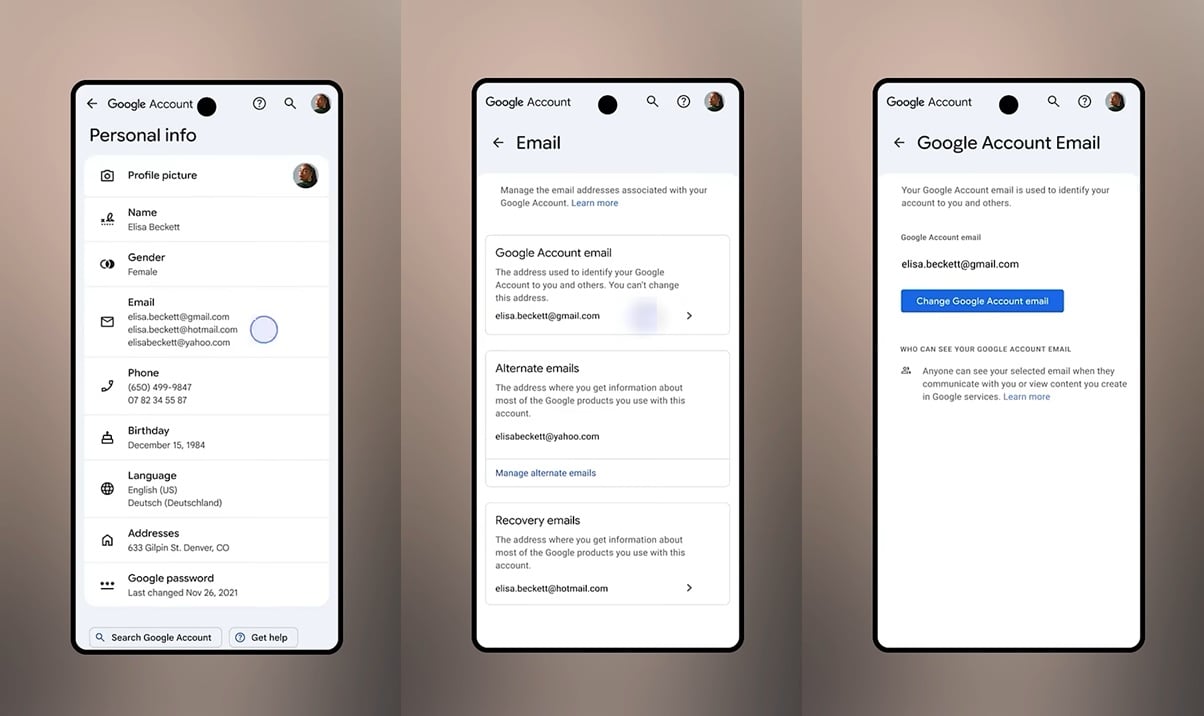
    Change Gmail
    How to change @gmail address

    After applying the changes, your old address will automatically change to the new username, and it will reflect across your apps and services like Gmail, Photos, Drive, and more.

    If you don’t see the toggle, it means the feature is not available for your account or region yet.

    Google hasn’t clarified whether the feature has rolled out widely outside the US, but it doesn’t appear to be the case.

    Regardless, when the feature does show up, and you change the address, Google won’t delete your old username or allocate it to new accounts, as it will remain linked to your current account.


    tines

    Automated pentesting proves the path exists. BAS proves whether your controls stop it. Most teams run one without the other.

    This whitepaper maps six validation surfaces, shows where coverage ends, and provides practitioners with three diagnostic questions for any tool evaluation.


    Source link

    Share. Facebook Twitter Pinterest LinkedIn Tumblr Email
    Previous ArticlePX4 Autopilot | CISA
    Next Article SSB-491780 V1.0: Missing anti-tamper protection in SIPORT Desktop Client Application
    admin
    • Website

    Related Posts

    News

    Accelerating Our Footprint and Innovation: Why VulnCheck Posted a Record-Setting Q3 | Blog

    April 8, 2026
    News

    Is a $30,000 GPU Good at Password Cracking?

    April 8, 2026
    News

    InfoSec News Nuggets 04/08/2026

    April 8, 2026
    Add A Comment

    Comments are closed.

    Demo
    Top Posts

    Global Takedown of Massive IoT Botnets Halts Record-Breaking Cyberattacks

    March 20, 202619 Views

    Catchy & Intriguing

    March 17, 202619 Views

    The Grandparent Scam: How AI Voice Technology Makes This Old Con Deadlier Than Ever

    March 18, 202617 Views
    Stay In Touch
    • Facebook
    • YouTube
    • TikTok
    • WhatsApp
    • Twitter
    • Instagram
    Latest Reviews
    85
    Featured

    Pico 4 Review: Should You Actually Buy One Instead Of Quest 2?

    January 15, 2021 Featured
    8.1
    Uncategorized

    A Review of the Venus Optics Argus 18mm f/0.95 MFT APO Lens

    January 15, 2021 Uncategorized
    8.9
    Editor's Picks

    DJI Avata Review: Immersive FPV Flying For Drone Enthusiasts

    January 15, 2021 Editor's Picks

    Subscribe to Updates

    Get the latest tech news from FooBar about tech, design and biz.

    Demo
    Most Popular

    Global Takedown of Massive IoT Botnets Halts Record-Breaking Cyberattacks

    March 20, 202619 Views

    Catchy & Intriguing

    March 17, 202619 Views

    The Grandparent Scam: How AI Voice Technology Makes This Old Con Deadlier Than Ever

    March 18, 202617 Views
    Our Picks

    Incident: Eagers Automotive says IT outage stems from cyber incident | iTnews

    April 8, 2026

    Accelerating Our Footprint and Innovation: Why VulnCheck Posted a Record-Setting Q3 | Blog

    April 8, 2026

    CISA Adds One Known Exploited Vulnerability to Catalog

    April 8, 2026

    Subscribe to Updates

    Get the latest creative news from FooBar about art, design and business.

    Facebook X (Twitter) Instagram Pinterest
    • Home
    • Technology
    • Gaming
    • Phones
    • Buy Now
    © 2026 ThemeSphere. Designed by ThemeSphere.

    Type above and press Enter to search. Press Esc to cancel.