


Microsoft released the KB5120998 preview cumulative update for Windows 11 versions 25H2 and 24H2, which comes with 35 changes, including improvements to the Start menu, taskbar, and Windows search.
KB5120998 is a preview update that lets IT administrators test Windows bug fixes, improvements, and new features before they roll out to all users during next month’s Patch Tuesday release.
However, unlike cumulative updates, monthly optional updates do not include security fixes and provide only quality improvements.

After installing the August 2026 preview update, users can move the taskbar to the bottom, top, left, or right side of their screen in Settings > Personalization > Taskbar > Taskbar behaviors > Taskbar position, with most customization settings, like never combining taskbar icons, working in every position.
The KB5120998 also adds a new smaller taskbar option that reduces the taskbar height and the size of taskbar icons to maximize screen space on smaller devices, and small or large size options for the Start menu (in Settings > Personalization > Taskbar > Taskbar behaviors > Taskbar size dialog), as well as the ability to independently show or hide the Pinned, Recommended, and All sections, and to hide the account name and profile picture.
With KB5120998, Microsoft has also started rolling out the administrator protection security feature that allows users to perform admin tasks using just-in-time privileges.
“Administrator protection is not classified as a formal security boundary; it hardens the security against elevation-of-privilege attacks with the introduction of profile separation,” Microsoft said. “This feature is turned off by default and can be enabled using OMA-URI in Microsoft Intune or through Group Policy.”
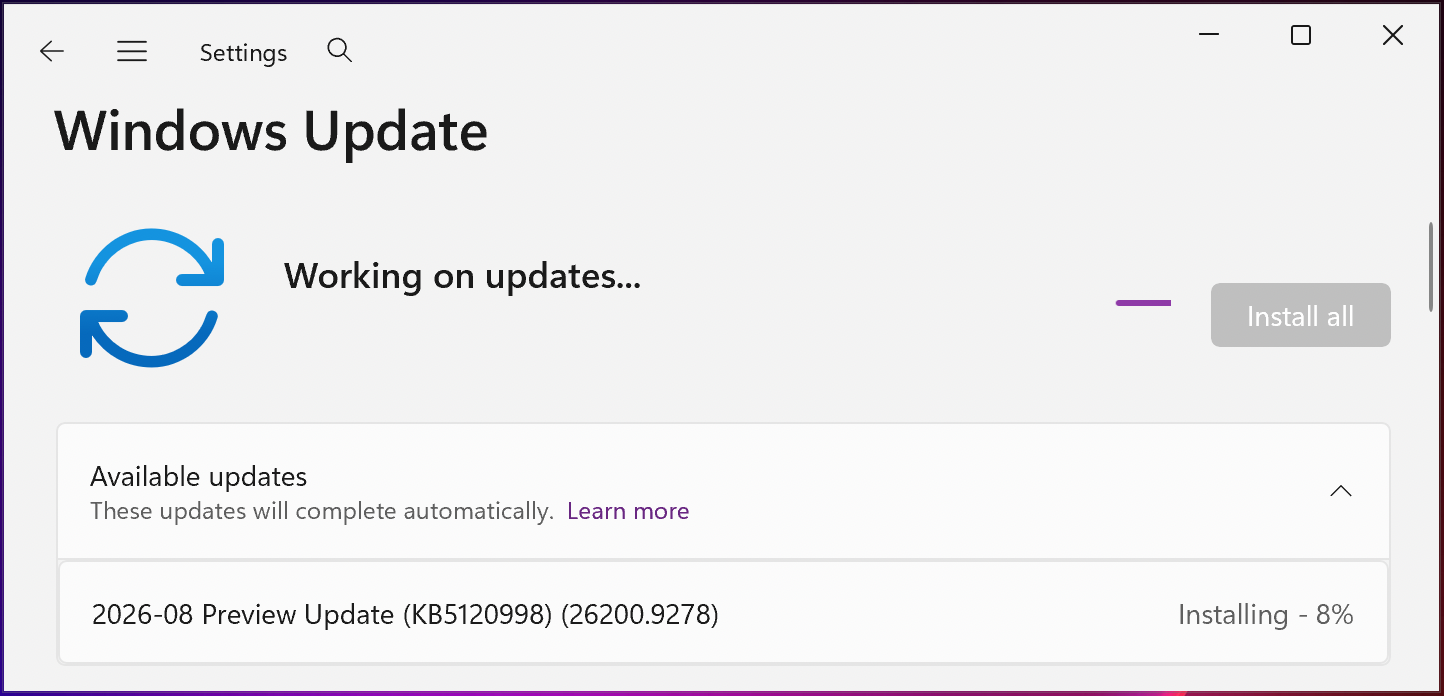
You can install KB5120998 by opening Windows Settings, clicking on Windows Update, and then clicking ‘Check for Updates.’
Since this is an optional update, you will need to click the “Download and install” link unless you already have the “Get the latest updates as soon as they’re they’re available” option enabled, which prompts the OS to install it automatically.
You can also manually download and install the KB5120998 preview update from the Microsoft Update Catalog.
Windows 11 KB5120998 highlights
Once installed, this optional non-security update will upgrade Windows 11 25H2 and 24H2 devices to builds 26200.9278 and 26100.9278, respectively.
The August 2026 preview update comes with many other changes, some of the more important ones highlighted below:
- Windows now automatically indexes your most-used folders so those files appear in subsequent search results. You can control the setting at Settings > Privacy & Security > Search > Automatically find additional relevant locations.
- This update improves restart behavior so PCs that were manually put to sleep return to sleep after completing an update, even when automatic sleep is set to Never.
- This update adds support for participating apps to coordinate their updates with Windows Update. Supported apps can benefit from improved scheduling and a more streamlined update experience. For more information, see Windows Update Orchestration Platform (UOP).
- This update improves resiliency and recovery from potential VPN process-related background issues that can cause processes to stop responding.
- Starting in August 2026, Windows 11, version 24H2 and 25H2 will no longer include the Windows Management Instrumentation Command-line (WMIC) utility. WMIC is already removed by default in new installations of Windows 11, versions 24H2 and 25H2, and will no longer be available as a Feature on Demand (FoD).
On Thursday, Microsoft warned customers that their systems may reboot one more time after deploying the August 2026 optional update and updates rolling out over the next several months.
“With recent and upcoming Windows updates over the next few months, a limited number of consumer and business devices might experience one additional restart during installation,” Microsoft noted in a message center update. “This one‑time restart occurs after a Secure Boot certificate update is applied as part of the Secure Boot update process.”
Earlier this month, it also reminded customers that devices running Home and Pro editions of Windows 11 24H2 will stop receiving updates in two months. However, Windows 11 24H2 Enterprise and Education editions will remain under mainstream support until October 2027.
Users are advised to upgrade to Windows 11 25H2 (also known as the Windows 11 2025 Update), which became generally available in September 2024.

Overall prevention scores can hide what happens after initial access. Once attackers are using valid credentials, prevention drops sharply.
The Blue Report 2026 measures defenses technique by technique across 338 million simulations run in customer production environments.
