



Close Menu

    Subscribe to Updates

    Get the latest creative news from FooBar about art, design and business.

    What's Hot

    Palo Alto GlobalProtect VPN auth bypass flaw now exploited in attacks

    May 30, 2026

    Jinan USR IOT Technology Limited (PUSR) USR-W610 RS232/485 to Wi-Fi/Ethernet Converter

    May 30, 2026

    CVE-2026-10127 | THREATINT

    May 30, 2026
    Facebook X (Twitter) Instagram
    • Demos
    • Technology
    • Gaming
    • Buy Now
    Facebook X (Twitter) Instagram Pinterest Vimeo
    Canadian Cyber WatchCanadian Cyber Watch
    • Home
    • News
    • Alerts
    • Tips
    • Tools
    • Industry
    • Incidents
    • Events
    • Education
    Subscribe
    Canadian Cyber WatchCanadian Cyber Watch
    Home»News»Microsoft Defender can now automatically isolate hacked endpoints
    News

    Microsoft Defender can now automatically isolate hacked endpoints

    adminBy adminMay 26, 2026No Comments3 Mins Read
    Share Facebook Twitter Pinterest LinkedIn Tumblr Reddit Telegram Email
    Share
    Facebook Twitter LinkedIn Pinterest Email


    Microsoft Defender for Endpoint

    Microsoft is testing a new Defender for Endpoint capability that will automatically isolate compromised endpoints to thwart attackers’ attempts to move laterally across the network.

    This is now available in preview mode and works as part of automatic attack disruption, a feature designed to contain attacks, limit their impact, and provide security teams with more remediation time.

    Compromised endpoints that are automatically isolated are disconnected from the network to reduce the risk of further impact, but they retain connectivity to the Microsoft Defender for Endpoint service, which will continue to monitor the device.

    “When a device in your organization is suspected to be compromised, Microsoft Defender for Endpoint can automatically isolate the device as part of automatic attack disruption,” Microsoft said.

    “Automatic isolation helps reduce the risk of further impact on the organization, limit attacker lateral movement, and prevent impacts such as data exfiltration and ransomware propagation.”

    Automatic device isolation works only on onboarded end-user workstations managed by Microsoft Defender for Endpoint.

    ​As Microsoft explained, they can also be released from containment at any time by security operators after completing the incident investigation and mitigating the risks.

    To release a device from automatic isolation, select the device from the “Device inventory” or open the device page and select “Release from isolation” from the action menu.
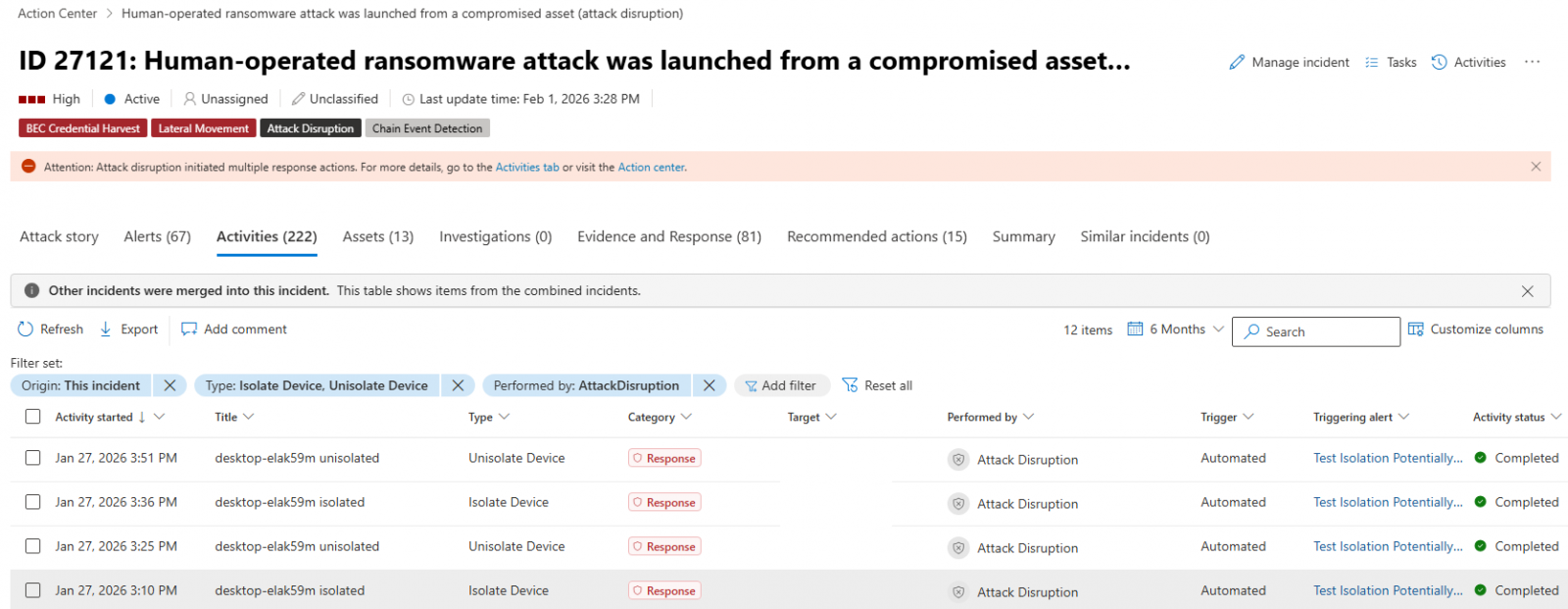
    Defender for Endpoint automatic device isolation
    Defender for Endpoint automatic device isolation (Microsoft)

    Nearly four years ago, in June 2022, Microsoft also announced that admins could manually contain compromised, unmanaged Windows devices by cutting off incoming and outgoing communication with onboarded Defender for Endpoint endpoints.

    Microsoft also began testing device isolation support for Defender for Endpoint on onboarded Linux devices in January 2023, with the capability reaching general availability in October 2023.

    The same month, it revealed that Defender for Endpoint could also isolate compromised user accounts as part of automatic attack disruption to block lateral movement in hands-on-keyboard ransomware attacks.

    More recently, Microsoft began testing another new feature for the Defender for Endpoint enterprise endpoint security platform that automatically blocks traffic to and from undiscovered Windows endpoints, preventing attackers from breaching other non-compromised devices on the network.

    Earlier this month, it revealed another Defender for Endpoint preview feature that will allow admins to schedule antivirus scans on onboarded Linux systems using the Microsoft Defender portal, mdatp managed JSON configuration, or the mdatp command-line tool.

    “Scheduled scans support daily quick scans, interval-based quick scans, and weekly full scans, with options for low-priority execution, idle-time scheduling, and randomized start times,” it said.

    article image

    Automated pentesting tools deliver real value, but they were built to answer one question: can an attacker move through the network? They were not built to test whether your controls block threats, your detection rules fire, or your cloud configs hold.

    This guide covers the 6 surfaces you actually need to validate.

    Download Now


    Source link

    Share. Facebook Twitter Pinterest LinkedIn Tumblr Email
    Previous ArticleSSA-314390 V1.0: LDAP Injection Vulnerability in Mendix LDAP Module
    Next Article CVE-2026-25713 | THREATINT
    admin
    • Website

    Related Posts

    News

    Palo Alto GlobalProtect VPN auth bypass flaw now exploited in attacks

    May 30, 2026
    News

    New CIFSwitch Linux flaw gives root on multiple distributions

    May 30, 2026
    News

    ‘Highly Plausible’ Aliens on Europa Are Earthlings’ Descendants, Study Says

    May 30, 2026
    Add A Comment

    Comments are closed.

    Demo
    Top Posts

    Catchy & Intriguing

    March 17, 202674 Views

    Defending Canada’s Digital Frontier: Combating Phishing, Social Engineering, Ransomware, and Malware

    March 23, 202629 Views

    The Essential Guide to Removing Computer Infections: Step-by-Step Remedies

    March 20, 202627 Views
    Stay In Touch
    • Facebook
    • YouTube
    • TikTok
    • WhatsApp
    • Twitter
    • Instagram
    Latest Reviews
    85
    Featured

    Pico 4 Review: Should You Actually Buy One Instead Of Quest 2?

    January 15, 2021 Featured
    8.1
    Uncategorized

    A Review of the Venus Optics Argus 18mm f/0.95 MFT APO Lens

    January 15, 2021 Uncategorized
    8.9
    Editor's Picks

    DJI Avata Review: Immersive FPV Flying For Drone Enthusiasts

    January 15, 2021 Editor's Picks

    Subscribe to Updates

    Get the latest tech news from FooBar about tech, design and biz.

    Demo
    Most Popular

    Catchy & Intriguing

    March 17, 202674 Views

    Defending Canada’s Digital Frontier: Combating Phishing, Social Engineering, Ransomware, and Malware

    March 23, 202629 Views

    The Essential Guide to Removing Computer Infections: Step-by-Step Remedies

    March 20, 202627 Views
    Our Picks

    Palo Alto GlobalProtect VPN auth bypass flaw now exploited in attacks

    May 30, 2026

    Jinan USR IOT Technology Limited (PUSR) USR-W610 RS232/485 to Wi-Fi/Ethernet Converter

    May 30, 2026

    CVE-2026-10127 | THREATINT

    May 30, 2026

    Subscribe to Updates

    Get the latest creative news from FooBar about art, design and business.

    Facebook X (Twitter) Instagram Pinterest
    • Home
    • Technology
    • Gaming
    • Phones
    • Buy Now
    © 2026 ThemeSphere. Designed by ThemeSphere.

    Type above and press Enter to search. Press Esc to cancel.