




A banking malware operation active since mid-2025 has been using a toolkit named KREMLIN to install malicious Chrome and Edge extensions that steal credentials, session tokens, and sensitive data.
Researchers at Elastic Security Labs found that the malicious extensions bypass Chromium’s integrity mechanisms and load in browsers as if they had been approved by the user.
The infection chain starts after the target user opens a JavaScript file disguised as a bank receipt, invoice, payment record, or business document.
After passing anti-sandbox checks, the file triggers a fake error while simultaneously downloading Node.js, establishing persistence through a scheduled task, and retrieving the additional payload location from an Ethereum smart contract.
Despite the name, KREMLIN is linked to a Brazilian operation responsible for at least seven campaigns since May 2025 that use lures impersonating 12 banks.
Installing Chrome and Edge add-ons
A standout feature of KREMLIN is its capability to install extensions on Chrome and Edge browsers without asking the user to approve them.
It waits for the browser to close or terminates it when it detects idle status, and then copies the extension into the app’s profile directories. Next, it enables developer mode and adds the extension to Chromium’s Secure Preferences.
To hide its activity, the malware uses the encryption keys the browser uses to protect sensitive data and then recreates the integrity checks Chrome uses to detect changes in browser preferences.
This makes the malicious extension appear valid to the browser despite never being approved by the user, a documented but rarely used technique according to the researchers.
“KREMLIN uses a documented technique rarely observed in malware: it manually copies the extension into the browser’s profile directories and registers it in the Secure Preferences file,” Elastic explains.
“Because Chromium protects these entries with cryptographic integrity checks, the malware must retrieve the required keys and regenerate the associated HMACs and encrypted hashes.”
Once installed, the extension masquerades as AVSync and performs the following actions:
- Steals cookies, local storage, and session storage
- Keylogs text entered into forms, including passwords
- Captures screenshots and page source
- Enumerates open tabs and browsing history
- Intercepts HTTP request bodies and headers
- Injects attacker-controlled HTML into websites
- Redirects clicks to attacker-selected destinations
- Receives commands through a WebSocket connection
Apart from the malicious extension, the KREMLIN toolkit also acts as an info-stealer that can archive and exfiltrate browser databases, cookies, installed extensions, and the App-Bound cryptographic keys needed to decrypt protected data.
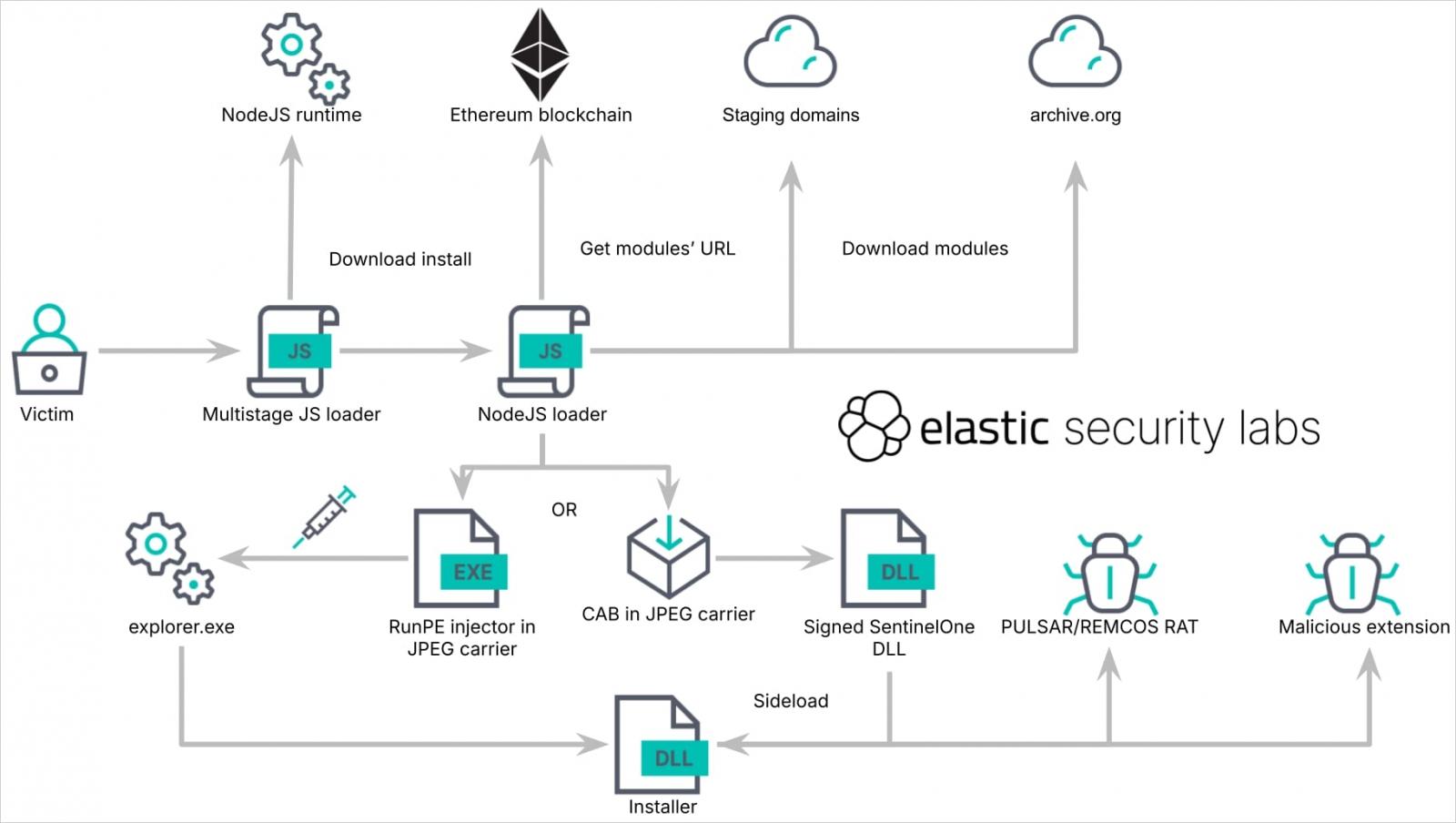
Source: Elastic
Disrupting the operation
Elastic Security Labs researchers found that KREMLIN malware campaigns use Ethereum smart contracts as dead-drop resolvers and also abuse the Internet Archive service to host payloads hidden inside JPEG images.
In more recent campaigns, the threat actor deployed the REMCOS remote access tool, but past operations pushed the Pulsar RAT. According to the researchers, the switch was likely due to REMCOS being more feature rich.
By connecting the dots through infrastructure analysis and code artifacts, the researchers found the Ethereum wallet that deployed and updated the smart contracts
According to the researchers, the wallet handled roughly 20,800 USDT (Tether) and 19,000 USDT in incoming and outgoing transfers, respectively. Elastic has confirmed 1,515 infected systems, almost all located in Brazil.
The security firm disrupted the current KREMLIN campaign by registering a domain that the malware used as an anti-sandbox canary, causing the loader to stop due to false flags on systems that would otherwise qualify for infection.
Elastic Security Labs researchers shared the tactics and techniques used in KREMLIN attacks, as well as a set of indicators of compromise.

Join Mikko Hyppönen and security leaders from the NFL, CHANEL, and Atlassian for a two-hour digital summit on what AI-speed attacks change, what defenders should stop doing, and how to validate, decide, fix, and re-validate at machine speed.
