


Single sign on (SSO) simplifies access by letting users log into multiple systems with one set of credentials. While this delivers clear benefits to the authentication process, that convenience can also concentrate risk, as the 2025 University of Pennsylvania breach showed.
According to reports, attackers compromised a PennKey SSO account and used that access to reach internal systems including VPN, Salesforce, Qlik, SAP, and SharePoint. The attack also resulted in the theft of data on 1.2 million individuals.
That does not mean SSO is insecure. When it is configured and protected properly, SSO can improve security by reducing password sprawl, centralizing access policies, and making it easier to enforce multi-factor authentication (MFA).
However, organizations can only enjoy those benefits when SSO is treated as a critical security control. If one login opens the door to multiple systems, that login needs robust protection.
So, is your SSO login protected enough? To answer that, organizations need to look beyond whether SSO is switched on, and focus on how it is secured.
Start with strong SSO passwords
‘Implement strong passwords’ isn’t new advice, but it is especially crucial if one credential can unlock multiple systems. However, strong doesn’t have to mean frustrating; after all, SSO is designed to reduce friction during authentication.
The latest guidance from NIST puts the emphasis on length and usability, alongside screening for weak or compromised passwords. For scenarios where single-factor passwords are still acceptable, NIST recommends at least 15 characters.
Passwords used alongside MFA must be at least eight characters, and systems should allow users to create passwords up to 64 characters. NIST also says organizations should check new passwords against blocklists of commonly used, expected, or previously compromised passwords.
Just as importantly, NIST advises against some legacy password rules that still appear in many organizations. Mandatory complexity requirements and routine password resets can push users toward predictable patterns, such as changing one digit or adding a symbol at the end.
Verizon’s Data Breach Investigation Report found stolen credentials are involved in 44.7% of breaches.
Effortlessly secure Active Directory with compliant password policies, blocking 6+ billion compromised passwords, boosting security, and slashing support hassles!
Add MFA, but make sure it can stand up to modern attacks
A strong SSO password shouldn’t be the only thing standing between an attacker and your applications. Infostealers have made it easier than ever for attackers to scrape passwords and other authentication information, and even passwords that meet regulatory requirements appear regularly in these logs.
MFA adds another layer of protection, making it harder for an attacker to turn a compromised password into a successful login. For SSO, MFA should be enforced consistently. That means applying it across users, apps, and access scenarios, rather than only enabling it for a handful of “high-risk” accounts.
It is also worth looking at the type of MFA in place. SMS codes and basic one-time passwords are better than passwords alone, but they are not the strongest option.
Where possible, organizations should move toward phishing-resistant methods such as FIDO2 security keys, WebAuthn, or passkeys, especially for privileged users and access to sensitive systems.
Implement secure MFA with Specops
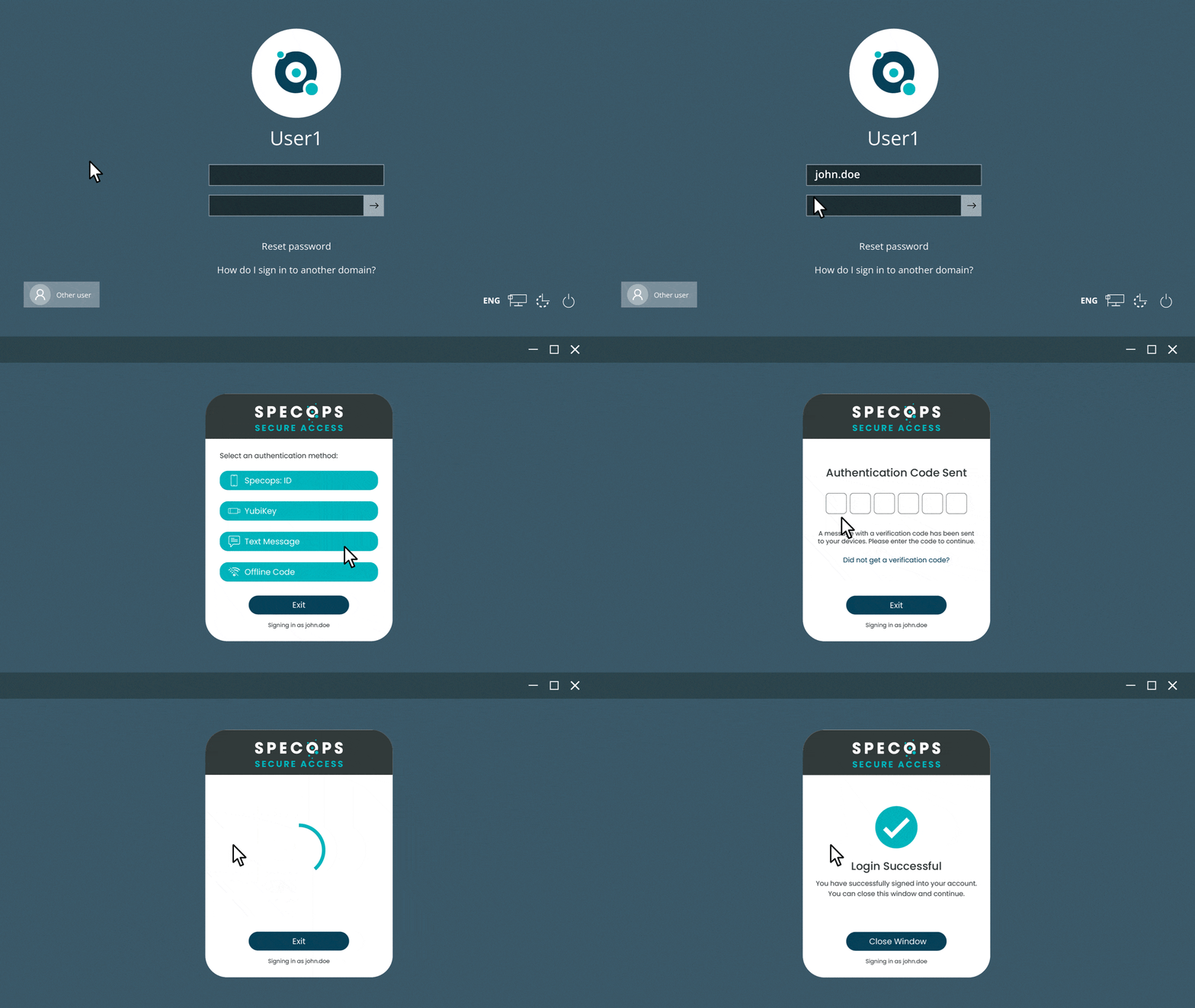
Solutions like Specops Secure Access help organizations defend against password attacks and includes support for SSO for SaaS applications via OIDC and SAML.
Alongside adding MFA to Windows Logon, RDP and VPN authentications, Specops Secure Access helps organizations manage user access from a single place, reducing the identity attack surface while satisfying regulatory audits and cyber insurance conditions.
Secure the assets behind the SSO login
Organizations also need to secure the assets that sit behind SSO and control how identity is issued, trusted, and delegated.
Start with IdP administrator accounts. These accounts can change authentication policies, add applications, add and reset users, and approve integrations. They should be protected with phishing-resistant MFA, separate admin accounts, just-in-time access, and close monitoring.
Signing certificates and keys also need strict control. SAML certificates and token-signing keys are what allow applications to trust the identity provider. If they are exposed or misused, attackers may be able to impersonate users or abuse trusted sessions. Access should be tightly limited, changes should trigger alerts, and certificates should be rotated before they expire.
OAuth secrets and credentials deserve the same attention. Client secrets, app credentials, and refresh tokens can give attackers long-lived access, sometimes without another interactive login. Store them in a secrets vault, rotate them regularly, and review app registrations for excessive permissions.
Finally, review consent grants and delegated permissions. Attackers often look for ways to maintain access after the initial compromise, and risky third-party app permissions can give them that route. Restrict user consent, require admin approval for sensitive permissions, and remove stale or overprivileged grants.
Is SSO secure?
SSO is still worth using, provided it is implemented and protected properly. The benefit for users is simple: access becomes easier. They don’t have to remember separate passwords for every application or keep resetting forgotten credentials.
In most cases, SSO lets them sign in once and move between connected resources without unnecessary friction.
That also helps the service desk, as fewer forgotten passwords and account lockouts mean fewer support tickets, giving IT teams more time to focus on higher-value work.
From a security perspective, SSO gives organizations a central place to manage authentication. Applications do not need to handle the user’s password directly, instead relying on trusted authentication tokens from the identity provider. This reduces password exposure across different services and gives security teams one place to enforce controls such as MFA, conditional access, logging, and account revocation.
SSO can also speed up access to business-critical resources. When users do not need to enter credentials for every tool, they can get to the systems they need faster and with less disruption.
There are compliance benefits too. Centralized access management makes it easier to support reporting, auditing, strong authentication requirements, and rapid access removal when users leave or roles change.
SSO will not cover every sign-in scenario, and it is not secure by default. But when it is hardened properly, it can improve the user experience, reduce helpdesk pressure, strengthen security, and make access easier to govern.
Ensure your SSO is secure with Specops
The security of SSO environments currently depends heavily on credential strength, so it’s crucial that policies enforce strong passwords. Specops helps here with Specops Password Policy, helping organizations simplify policy management and continuously block over 6 billion unique compromised passwords.
Specops Secure Access then extends that protection by applying MFA to SAML and OIDC-based applications, including those federated through third-party identity providers.
If you’re interested in seeing how we can help strengthen the security of your SSO environment, contact us today or book a demo.
Sponsored and written by Specops Software.
