



Close Menu

    Subscribe to Updates

    Get the latest creative news from FooBar about art, design and business.

    What's Hot

    USB worm spreads crypto-stealing malware via Windows shortcut files

    June 20, 2026

    Nintendo confirms data stolen in WebMD subsidiary cyberattack

    June 20, 2026

    Home Office Under Attack: How Cybercriminals Exploit Remote Work—and How You Can Fight Back

    June 19, 2026
    Facebook X (Twitter) Instagram
    • Demos
    • Technology
    • Gaming
    • Buy Now
    Facebook X (Twitter) Instagram Pinterest Vimeo
    Canadian Cyber WatchCanadian Cyber Watch
    • Home
    • News
    • Alerts
    • Tips
    • Tools
    • Industry
    • Incidents
    • Events
    • Education
    Subscribe
    Canadian Cyber WatchCanadian Cyber Watch
    Home»News»Microsoft: June 2026 Windows updates break Recycle Bin prompts
    News

    Microsoft: June 2026 Windows updates break Recycle Bin prompts

    adminBy adminJune 19, 2026No Comments2 Mins Read
    Share Facebook Twitter Pinterest LinkedIn Tumblr Reddit Telegram Email
    Share
    Facebook Twitter LinkedIn Pinterest Email


    Windows

    Microsoft has confirmed a confusing Windows bug that causes different filenames to appear in the confirmation dialog when deleting a file from the Recycle Bin.

    “When permanently deleting a single item from the Recycle Bin, the confirmation dialog displays the internal Recycle Bin filename (for example, $Rxxxxx.ext) instead of the original filename,” the company explained in a Thursday update to the Windows release health dashboard.

    “The Recycle Bin itself correctly displays the original filename, and restoring the item also restores it using the original filename.”

    image

    While Microsoft didn’t share how widespread this known issue is, it said that it affects all supported Windows releases across both client and server platforms after installing the June 2026 security updates.

    The complete list of affected Windows versions includes:

    • ​Client: Windows 11, version 26H1; Windows 11, version 25H2; Windows 11, version 24H2; Windows 11, version 23H2; Windows 10, version 22H2; Windows 10 Enterprise LTSC 2021; Windows 10 Enterprise LTSC 2019; Windows 10 Enterprise LTSB 2016,
    • ​Server: Windows Server 2025; Windows Server 2022; Windows Server 2019; Windows Server 2016; Windows Server 2012 R2; Windows Server 2012.

    Microsoft said that its engineers are working on a fix for this bug, which will ship to affected systems in a future Windows update.
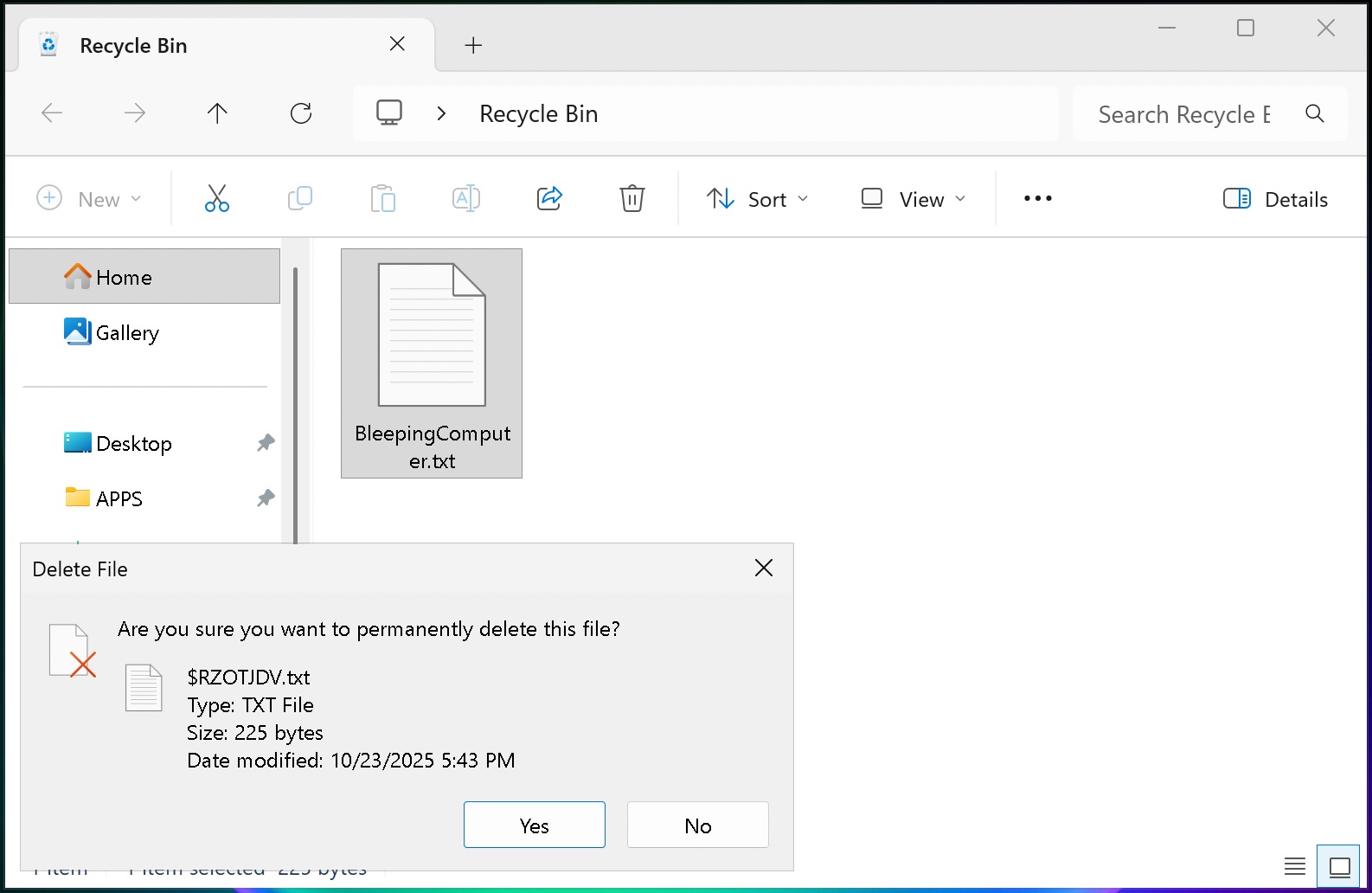
    Recycle Bin bug
    Recycle Bin bug (BleepingComputer)

    However, while a fix is not yet generally available, Microsoft added that a temporary workaround is available for businesses that will reach out to its Business Support team.

    “A workaround is available for affected devices. To apply this workaround in your organization and mitigate the issue, please contact Microsoft’s Support for business,” it noted.

    Earlier this week, Microsoft confirmed another issue that blocks third-party apps from launching Word, Excel, PowerPoint, Access, and other Office applications (or from opening documents) on Windows systems after installing the June 2026 updates.

    More recently, on Thursday, it also fixed a known issue that caused the June 2026 security updates to fail on Windows Server 2016 systems that didn’t have the May KB5087537 security update installed.


    article image

    Security teams log 54% of successful attacks and alert on just 14%. The rest move through your environment unseen.

    The Picus whitepaper shows how breach and attack simulation tests your SIEM and EDR rules so threats stop slipping by detection.

    Get the whitepaper


    Source link

    Share. Facebook Twitter Pinterest LinkedIn Tumblr Email
    Previous ArticleEvery AI Agent Is an Identity. Most Organizations Don’t Treat Them That Way
    Next Article Soft Skills for the Job Market: Resume Writing
    admin
    • Website

    Related Posts

    News

    USB worm spreads crypto-stealing malware via Windows shortcut files

    June 20, 2026
    News

    Nintendo confirms data stolen in WebMD subsidiary cyberattack

    June 20, 2026
    News

    Every AI Agent Is an Identity. Most Organizations Don’t Treat Them That Way

    June 19, 2026
    Add A Comment

    Comments are closed.

    Demo
    Top Posts

    Catchy & Intriguing

    March 17, 202677 Views

    IP Address Investigations and Local OSINT

    March 20, 202633 Views

    Defending Canada’s Digital Frontier: Combating Phishing, Social Engineering, Ransomware, and Malware

    March 23, 202632 Views
    Stay In Touch
    • Facebook
    • YouTube
    • TikTok
    • WhatsApp
    • Twitter
    • Instagram
    Latest Reviews
    85
    Featured

    Pico 4 Review: Should You Actually Buy One Instead Of Quest 2?

    January 15, 2021 Featured
    8.1
    Uncategorized

    A Review of the Venus Optics Argus 18mm f/0.95 MFT APO Lens

    January 15, 2021 Uncategorized
    8.9
    Editor's Picks

    DJI Avata Review: Immersive FPV Flying For Drone Enthusiasts

    January 15, 2021 Editor's Picks

    Subscribe to Updates

    Get the latest tech news from FooBar about tech, design and biz.

    Demo
    Most Popular

    Catchy & Intriguing

    March 17, 202677 Views

    IP Address Investigations and Local OSINT

    March 20, 202633 Views

    Defending Canada’s Digital Frontier: Combating Phishing, Social Engineering, Ransomware, and Malware

    March 23, 202632 Views
    Our Picks

    USB worm spreads crypto-stealing malware via Windows shortcut files

    June 20, 2026

    Nintendo confirms data stolen in WebMD subsidiary cyberattack

    June 20, 2026

    Home Office Under Attack: How Cybercriminals Exploit Remote Work—and How You Can Fight Back

    June 19, 2026

    Subscribe to Updates

    Get the latest creative news from FooBar about art, design and business.

    Facebook X (Twitter) Instagram Pinterest
    • Home
    • Technology
    • Gaming
    • Phones
    • Buy Now
    © 2026 ThemeSphere. Designed by ThemeSphere.

    Type above and press Enter to search. Press Esc to cancel.