


Most security teams think of NTFS junctions and symbolic links as niche file system features. They let one directory point to another, like a shortcut that the OS treats as real. They exist for backward compatibility, storage management, things that rarely come up in a SOC. But they have a property that makes them interesting from an offensive perspective: any user can create them.
No admin privileges are required, and no special permissions beyond write access to the target folder.
We discovered that by pointing a junction back at its own parent directory, an attacker can create recursive loops that generate effectively infinite file paths. Tools that try to scan the directory recursively, including EDR products, could follow the loop and never finish.
The malicious files sitting in the same folder go unexamined, creating a technique we’ve dubbed GhostTree.
How NTFS junctions work
Windows file paths are a fundamental part of the operating system, but they come with complexities. While most users interact with simple folder structures, the NTFS file system introduces advanced capabilities like junctions and symbolic links.
These features serve legitimate purposes, such as redirecting directories, maintaining backward compatibility with legacy applications that expect files to be in specific locations, or reorganizing files without physically moving them.
A junction is a type of NTFS reparse point that redirects one directory to another. Creating one requires only write permissions and a single command in CMD:
mklink /J C:\LinkToFolder C:\TargetFolder
This creates a junction named “LinkToFolder” that transparently points to “TargetFolder.” Any application accessing files through the junction sees the contents of the target directory as if they were local.
One constraint matters here though. Classic Windows systems impose a maximum path length of 260 characters, which is rooted in legacy software and file system design.
It is technically possible to extend this limit up to 32,767 characters via a registry key, but many applications and utilities are not equipped to handle paths beyond 260.
Even though NTFS supports longer paths, practical usage remains restricted by existing software. That limit determines how deep the recursive loops can go, and how many unique paths GhostTree can produce.
Safeguarding sensitive data starts with visibility — knowing where your information lives, who can access it, and how it’s being used.
The Varonis Data Security Platform automatically locks down exposure, continuously monitors activity across SaaS, IaaS, on-prem, and databases, and detects and responds to insider threats, ransomware, and AI abuse.
GhostBranch
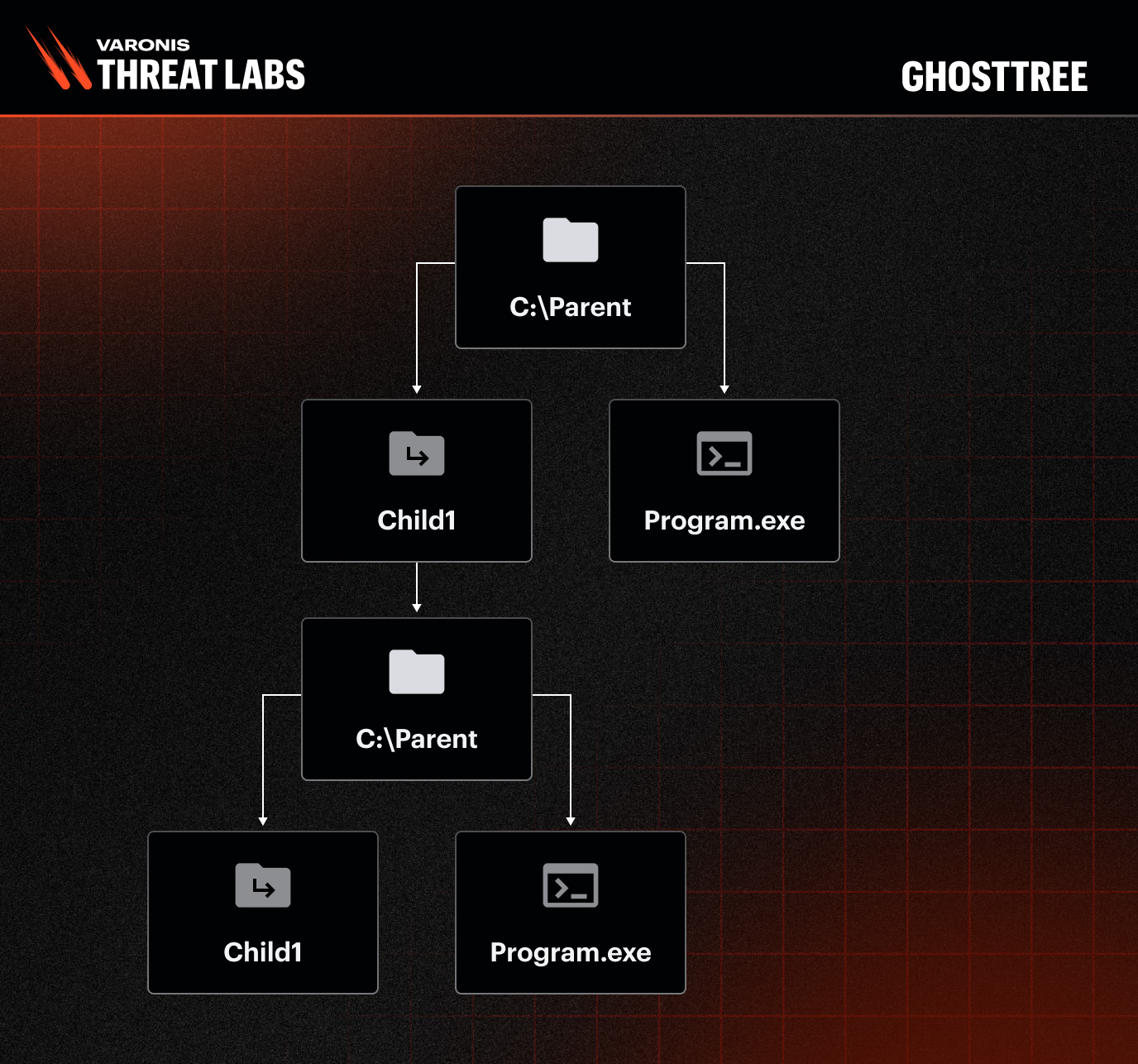
GhostBranch is the simpler of the two techniques. Any user can create a folder junction, setting both the junction’s name and destination. Consider this folder structure:
C:\Parent\program.exe
Run the command:
mklink /J C:\Parent\Child C:\Parent
This creates a logical loop by pointing a child folder back to its parent folder. The child directory now contains everything the parent does, including itself. The result is an unlimited number of valid paths to the same file:
C:\Parent\Child\Program.exe
C:\Parent\Child\Child\Program.exe
C:\Parent\Child\Child\Child\Child\Program.exe
Due to the loop, you can add multiple “Child” folders to the path, and it remains valid. Every one of these paths resolves to the same executable.
GhostTree
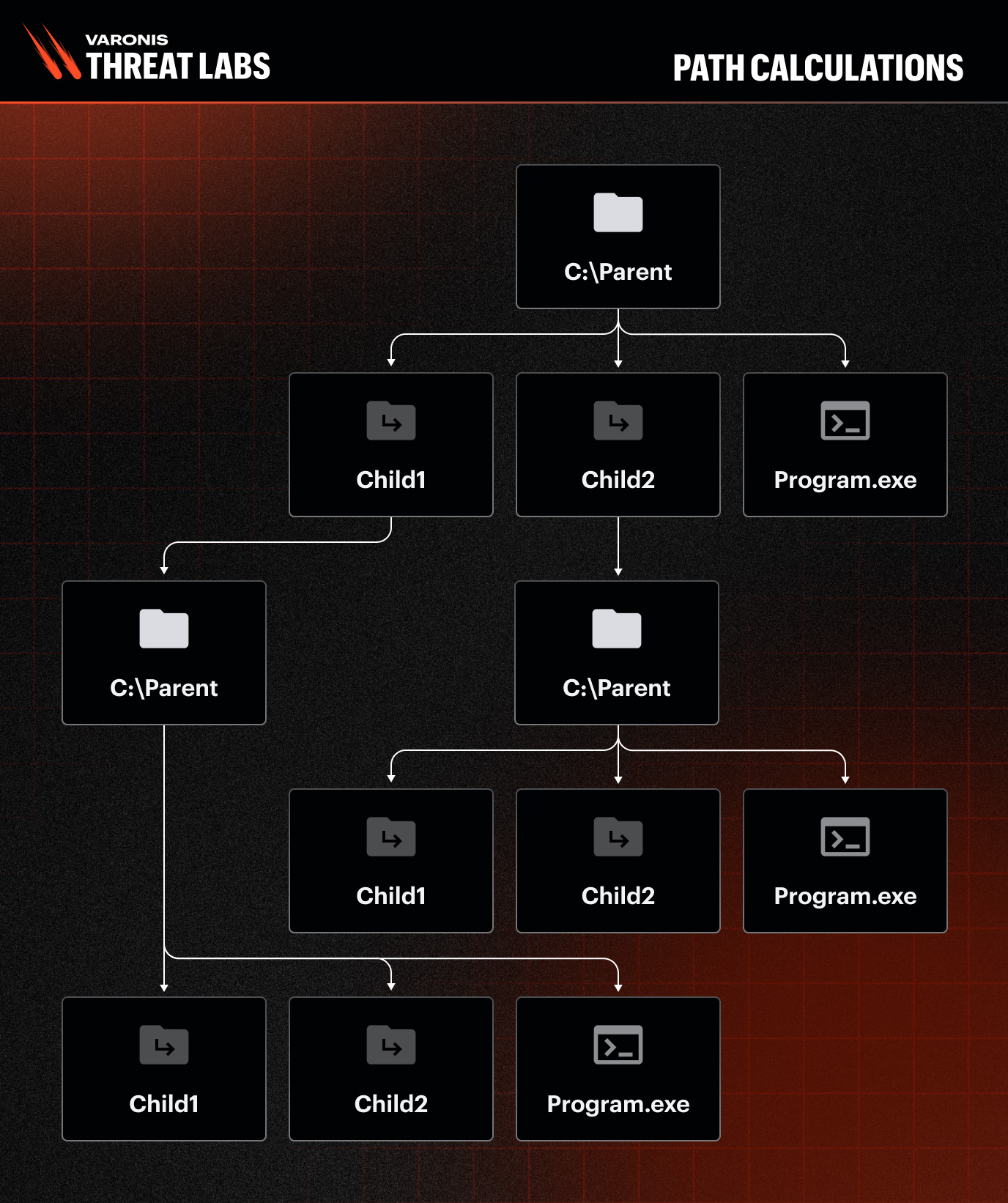
GhostTree builds on the GhostBranch concept by creating multiple child folders instead of one. For example, you can create two child folders:
mklink /J C:\Parent\Child1 C:\Parent
mklink /J C:\Parent\Child2 C:\Parent
Now every level in the path can branch through either Child1 or Child2, and both loop back to the parent. This allows various paths:
C:\Parent\Child1\Program.exe
C:\Parent\Child2\Program.exe
C:\Parent\Child1\Child1\Program.exe
C:\Parent\Child1\Child2\Program.exe
Path calculations
Both GhostBranch and GhostTree produce paths that can extend to the maximum length Windows allows. The difference is in path diversity, which is where GhostTree’s additional child folder changes things considerably.
GhostBranch
Within Windows, the maximum traditional path length is 260 characters. To maximize the number of directories, one can create single-letter folders (e.g., “P”) directly under the C: drive and employ an executable named 1.exe.
Example paths include:
C:\P\1.exe
C:\P\P\1.exe
C:\P\P\P\...\1.exe
This configuration allows for approximately 126 unique directory structures due to path length limitations.
GhostTree
The GhostTree method introduces two parent folders, “P” and “B”, in contrast to the single-folder structure used previously. Examples include:
C:\B\1.exe
C:\P\B\1.exe
C:\P\B\P\B\...\1.exe
While the maximum depth remains around 126 folders, each level may be named either “P” or “B,” effectively creating a binary tree-like structure. With this configuration, each node represents a distinct path, and the total number of possible nodes is calculated as:
2^126 ≈ 8.5 × 10^37
How big is that? It’s vastly larger than the number of grains of sand on Earth (8.5 × 10^18) or even the atoms in your body (10^27).
Why this matters for defenders
With just two lines of code, a user can generate endless valid paths, making it impossible to finish scanning parent directories with the dir command recursively. The same applies to EDR products that scan folders for malicious files. An attacker places malware in the parent directory, sets up the GhostTree structure, and the containing folder becomes effectively unscannable. The scan hangs. The malicious files go unexamined.
We tested this technique against Windows Defender and confirmed it could be used to evade folder scans.
We reported the issue to Microsoft. The ticket was closed with the explanation that “bypassing Defender is not crossing a security boundary.” The issue was subsequently patched regardless.
Techniques like GhostTree are a reminder that endpoint scanning is only one layer of defense. Monitoring file system activity at the data layer catches what scanners miss, including anomalous junction creation and recursive directory structures that should not exist in normal operations.
Varonis monitors file access patterns and detects this kind of anomalous activity across file systems and cloud infrastructure.
Schedule your demo today.
Sponsored and written by Varonis.
