

Close Menu

    Subscribe to Updates

    Get the latest creative news from FooBar about art, design and business.

    What's Hot

    KMW CCTV Security Cameras | CISA

    May 30, 2026

    US charges Google security engineer with Polymarket insider trading

    May 30, 2026

    CVE-2026-10152 | THREATINT

    May 30, 2026
    Facebook X (Twitter) Instagram
    • Demos
    • Technology
    • Gaming
    • Buy Now
    Facebook X (Twitter) Instagram Pinterest Vimeo
    Canadian Cyber WatchCanadian Cyber Watch
    • Home
    • News
    • Alerts
    • Tips
    • Tools
    • Industry
    • Incidents
    • Events
    • Education
    Subscribe
    Canadian Cyber WatchCanadian Cyber Watch
    Home»News»Microsoft testing adjustable taskbar, Start menu in Windows 11
    News

    Microsoft testing adjustable taskbar, Start menu in Windows 11

    adminBy adminMay 19, 2026No Comments3 Mins Read
    Share Facebook Twitter Pinterest LinkedIn Tumblr Reddit Telegram Email
    Share
    Facebook Twitter LinkedIn Pinterest Email


    Windows 11

    Microsoft has finally brought back the resizable taskbar and Start menu to Windows 11 in the latest preview version rolling out to Insiders in the Experimental channel.

    Starting with Windows 11 Insider Preview Build 26300.8493, the taskbar can now be configured to use smaller buttons and moved to the bottom, top, left, or right side of the screen.

    “The ability to move the taskbar to the top or sides of the screen has been one of the most requested features, and we are bringing it to Windows 11,” said Diego Baca, partner director of Microsoft Design.

    “With this update, when small taskbar is enabled, you get smaller icons, a shorter taskbar, and more vertical space for your apps (see video below). No restart or sign-out is required.”

    To change the taskbar position, Insiders have to go to Settings > Personalization > Taskbar > Taskbar behaviors, where they will find this new option alongside the taskbar icon alignment option.

    The taskbar size can be adjusted in the same dialog by checking the “Show smaller taskbar buttons” option, which reduces the height of both the icons and the taskbar.

    Microsoft is also rolling out changes to give Windows users more control over the Start menu, allowing them to toggle off recommended content and customize its size.

    “These controls are designed to work together. If you want a Start menu with just your pinned apps, you can turn off Recommended and All,” Boca added. “If you want a full Start that shows everything, you can leave it all on. The goal is simple: it is your choice, and it should be easy to make.”

    However, Microsoft will maintain a list of recently installed apps, as it is a key way for users to discover new applications alongside the Microsoft Store.

    Furthermore, Microsoft is improving file relevance by adjusting how files are displayed and ordered to prioritize the most relevant items, and will also allow users to hide their name and profile picture from the Start menu.
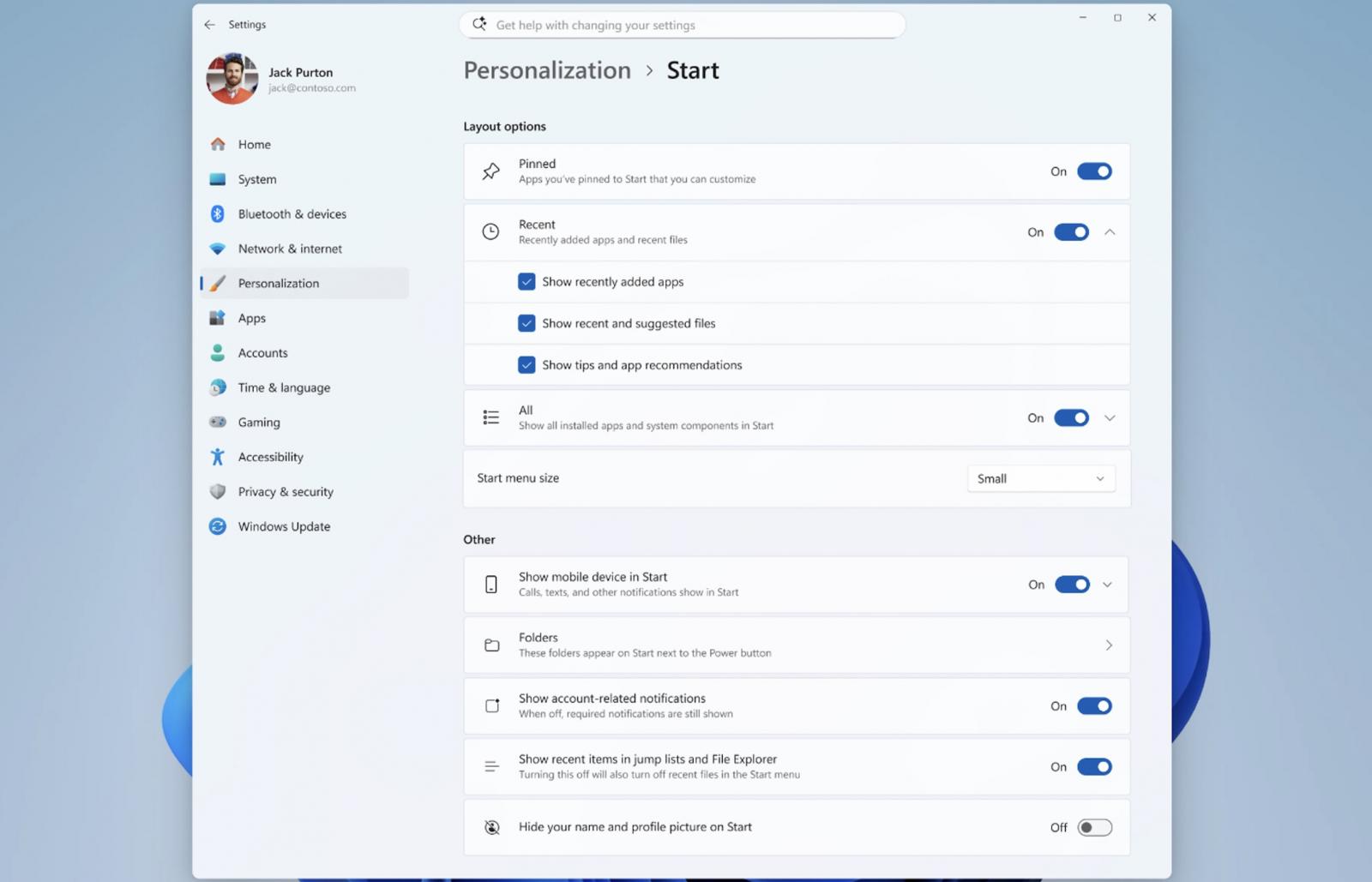
    New Start menu settings
    New Start menu settings (Microsoft)

    ​Earlier this month, Microsoft also announced that it’s testing a modern Windows Run dialog with dark mode support, which should be faster than the legacy version.

    This new Run dialog will also remove the “Browse” button, which was used by only 0.0038% of users in a sample of 35 million who opened Windows Run. Microsoft says the modern Run will not be enabled automatically, and users will need to turn it on manually in Settings > Advanced Settings.

    Windows president Pavan Davuluri announced some of these changes in March, when Microsoft pledged to improve Windows 11 system performance and make it more responsive and consistent.

    In addition to taskbar and Start menu improvements, the company plans to reduce notifications, simplify Windows settings, and ensure that device setup on new Windows PCs requires fewer reboots.

    Microsoft is also working on improving Windows search, aiming for a more consistent experience across the Start menu, taskbar, File Explorer, and Settings.

    “As part of this effort, we are evolving how Windows is built behind the scenes to raise the quality bar and deliver innovation where it matters most, shaped by the feedback we are hearing from you,” Davuluri said.

    article image

    Automated pentesting tools deliver real value, but they were built to answer one question: can an attacker move through the network? They were not built to test whether your controls block threats, your detection rules fire, or your cloud configs hold.

    This guide covers the 6 surfaces you actually need to validate.

    Download Now


    Source link

    Share. Facebook Twitter Pinterest LinkedIn Tumblr Email
    Previous ArticleSubnet Solutions PowerSYSTEM Center | CISA
    Next Article SSA-542540 V1.0: Out of Bounds Read Vulnerability in Teamcenter Visualization
    admin
    • Website

    Related Posts

    News

    US charges Google security engineer with Polymarket insider trading

    May 30, 2026
    News

    Palo Alto GlobalProtect VPN auth bypass flaw now exploited in attacks

    May 30, 2026
    News

    New CIFSwitch Linux flaw gives root on multiple distributions

    May 30, 2026
    Add A Comment

    Comments are closed.

    Demo
    Top Posts

    Catchy & Intriguing

    March 17, 202674 Views

    Defending Canada’s Digital Frontier: Combating Phishing, Social Engineering, Ransomware, and Malware

    March 23, 202629 Views

    The Essential Guide to Removing Computer Infections: Step-by-Step Remedies

    March 20, 202627 Views
    Stay In Touch
    • Facebook
    • YouTube
    • TikTok
    • WhatsApp
    • Twitter
    • Instagram
    Latest Reviews
    85
    Featured

    Pico 4 Review: Should You Actually Buy One Instead Of Quest 2?

    January 15, 2021 Featured
    8.1
    Uncategorized

    A Review of the Venus Optics Argus 18mm f/0.95 MFT APO Lens

    January 15, 2021 Uncategorized
    8.9
    Editor's Picks

    DJI Avata Review: Immersive FPV Flying For Drone Enthusiasts

    January 15, 2021 Editor's Picks

    Subscribe to Updates

    Get the latest tech news from FooBar about tech, design and biz.

    Demo
    Most Popular

    Catchy & Intriguing

    March 17, 202674 Views

    Defending Canada’s Digital Frontier: Combating Phishing, Social Engineering, Ransomware, and Malware

    March 23, 202629 Views

    The Essential Guide to Removing Computer Infections: Step-by-Step Remedies

    March 20, 202627 Views
    Our Picks

    KMW CCTV Security Cameras | CISA

    May 30, 2026

    US charges Google security engineer with Polymarket insider trading

    May 30, 2026

    CVE-2026-10152 | THREATINT

    May 30, 2026

    Subscribe to Updates

    Get the latest creative news from FooBar about art, design and business.

    Facebook X (Twitter) Instagram Pinterest
    • Home
    • Technology
    • Gaming
    • Phones
    • Buy Now
    © 2026 ThemeSphere. Designed by ThemeSphere.

    Type above and press Enter to search. Press Esc to cancel.