


Close Menu

    Subscribe to Updates

    Get the latest creative news from FooBar about art, design and business.

    What's Hot

    Threat Report: Email Compromise, Partner of Alberta Municipality

    April 25, 2026

    Siemens SINEC NMS | CISA

    April 25, 2026

    Vulnerability Prioritization | Blog | VulnCheck

    April 25, 2026
    Facebook X (Twitter) Instagram
    • Demos
    • Technology
    • Gaming
    • Buy Now
    Facebook X (Twitter) Instagram Pinterest Vimeo
    Canadian Cyber WatchCanadian Cyber Watch
    • Home
    • News
    • Alerts
    • Tips
    • Tools
    • Industry
    • Incidents
    • Events
    • Education
    Subscribe
    Canadian Cyber WatchCanadian Cyber Watch
    Home»News»Windows Update gets new controls to reduce forced restarts
    News

    Windows Update gets new controls to reduce forced restarts

    adminBy adminApril 25, 2026No Comments3 Mins Read
    Share Facebook Twitter Pinterest LinkedIn Tumblr Reddit Telegram Email
    Share
    Facebook Twitter LinkedIn Pinterest Email


    Windows 11

    Microsoft is rolling out Windows Update improvements that give users more control over how updates are installed while reducing disruption from frequent or poorly timed restarts.

    The company says the improvements are now rolling out to Windows Insiders, following user feedback that highlighted two key issues: updates are disrupting workflows, and there is a lack of control over when they are installed.

    “We are continually reading the feedback submitted about the Windows update experience. Personally, I’ve had the opportunity to read over 7,621 direct verbatims over the last few months,” explains Microsoft’s Aria Hanson.

    image

    “Across this feedback there are two key themes that persistently pop out: disruption caused by untimely updates and not enough control over when updates happen. The changes we’re rolling out today are focused on giving Windows users more control over their PC experience, while keeping devices secure by design and by default.”

    Microsoft has already introduced a new feature that lets Windows users skip updates during the out-of-box experience (OOBE), allowing them to access the desktop faster and install updates when it’s most convenient. This option is not available on managed commercial devices or systems that require updates to function.

    The company is now introducing changes to how update pauses work, allowing Windows users to select a specific date to pause updates for up to 35 days using a flyout calendar interface. This pause can then be extended repeatedly without a fixed limit.
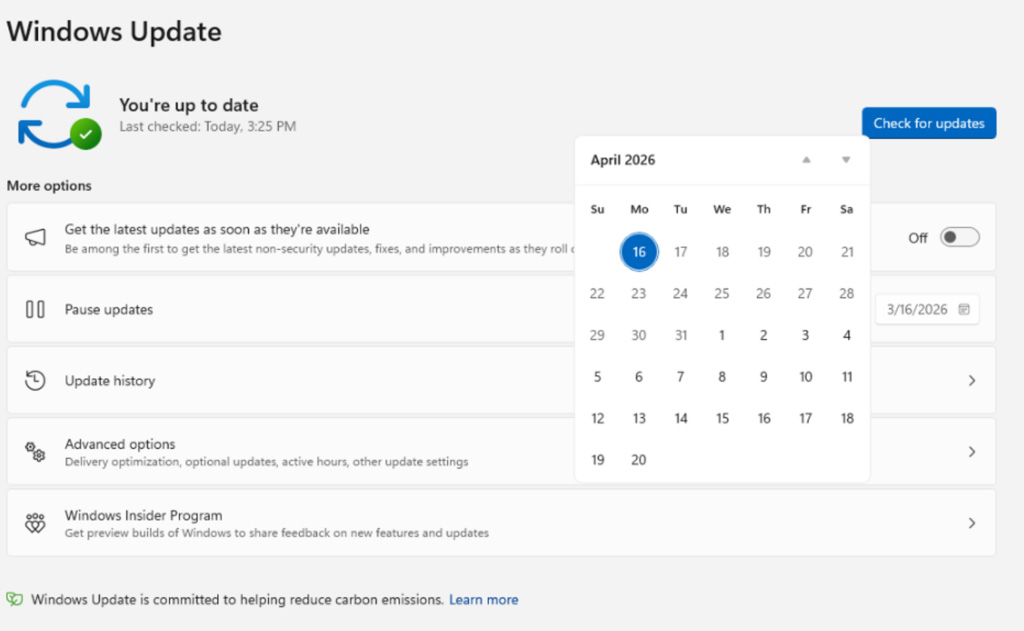
    Windows Update calendar flyout for pausing updates
    Windows Update calendar flyout for pausing updates
    Source: Microsoft

    Another change targets a common complaint, which is unexpected updates during shutdown or restart. 

    The Power menu will now separate standard power options from update-related actions, offering “Restart” and “Shut down” options without triggering updates, while the normal “Update and restart” and “Update and shut down” options are used when updates are ready to be installed.
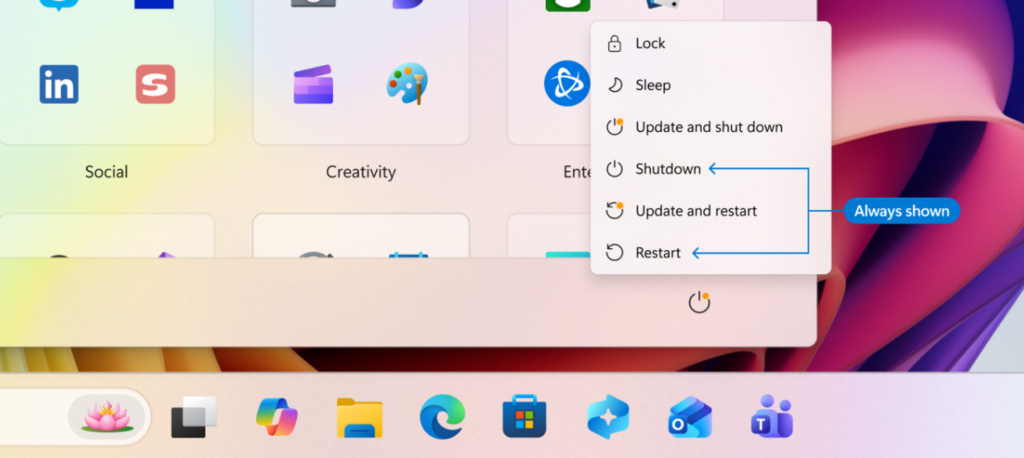
    New Update and Shutdown options when updates are available
    New Update and Shutdown options when updates are available
    Source: Microsoft

    Microsoft says they are also going to be clearer about how they offer updates, especially drivers, which are commonly offered under the same company name but without any indication of which device they are for.

    Windows Update will now display the device type, such as display, audio, or battery, directly in the update title to help users determine what is being installed.

    Finally, Microsoft is reducing disruptions by consolidating different update types into a single monthly restart. For example, Driver, .NET, and firmware updates will now be installed along with the monthly cumulative updates, reducing the number of required reboots.

    “Updates will download in the background, then will wait for a coordinated installation and restart. This installation and restart will align with the next Windows quality update or other update that you manually approve,” explains Hanson.

    “Users can always acquire all or specific updates earlier if desired by initiating download, install, restart (if applicable) for available updates.”

    The features are currently rolling out to Windows Insiders in the Dev and Experimental channels, with them later being rolled out to all users.


    article image

    AI chained four zero-days into one exploit that bypassed both renderer and OS sandboxes. A wave of new exploits is coming.

    At the Autonomous Validation Summit (May 12 & 14), see how autonomous, context-rich validation finds what’s exploitable, proves controls hold, and closes the remediation loop.

    Claim Your Spot


    Source link

    Share. Facebook Twitter Pinterest LinkedIn Tumblr Email
    Previous ArticleSiemens RUGGEDCOM CROSSBOW Station Access Controller (SAC)
    Next Article SSA-318832 V1.0: SQL Injection Vulnerability in SINEC NMS
    admin
    • Website

    Related Posts

    News

    Vulnerability Prioritization | Blog | VulnCheck

    April 25, 2026
    News

    Cyber chief: UK faces “perfect storm” for cyber security

    April 25, 2026
    News

    Threat actor uses Microsoft Teams to deploy new “Snow” malware

    April 25, 2026
    Add A Comment

    Comments are closed.

    Demo
    Top Posts

    Catchy & Intriguing

    March 17, 202662 Views

    The Grandparent Scam: How AI Voice Technology Makes This Old Con Deadlier Than Ever

    March 18, 202620 Views

    Global Takedown of Massive IoT Botnets Halts Record-Breaking Cyberattacks

    March 20, 202619 Views
    Stay In Touch
    • Facebook
    • YouTube
    • TikTok
    • WhatsApp
    • Twitter
    • Instagram
    Latest Reviews
    85
    Featured

    Pico 4 Review: Should You Actually Buy One Instead Of Quest 2?

    January 15, 2021 Featured
    8.1
    Uncategorized

    A Review of the Venus Optics Argus 18mm f/0.95 MFT APO Lens

    January 15, 2021 Uncategorized
    8.9
    Editor's Picks

    DJI Avata Review: Immersive FPV Flying For Drone Enthusiasts

    January 15, 2021 Editor's Picks

    Subscribe to Updates

    Get the latest tech news from FooBar about tech, design and biz.

    Demo
    Most Popular

    Catchy & Intriguing

    March 17, 202662 Views

    The Grandparent Scam: How AI Voice Technology Makes This Old Con Deadlier Than Ever

    March 18, 202620 Views

    Global Takedown of Massive IoT Botnets Halts Record-Breaking Cyberattacks

    March 20, 202619 Views
    Our Picks

    Threat Report: Email Compromise, Partner of Alberta Municipality

    April 25, 2026

    Siemens SINEC NMS | CISA

    April 25, 2026

    Vulnerability Prioritization | Blog | VulnCheck

    April 25, 2026

    Subscribe to Updates

    Get the latest creative news from FooBar about art, design and business.

    Facebook X (Twitter) Instagram Pinterest
    • Home
    • Technology
    • Gaming
    • Phones
    • Buy Now
    © 2026 ThemeSphere. Designed by ThemeSphere.

    Type above and press Enter to search. Press Esc to cancel.